
Stopping a suspicious email at the inbox is only part of the job. Brea phishing protection services can combine sender and domain safeguards, malicious-email filtering, and follow-up detection to help organizations counter spoofing and phishing attempts. Anti-phishing is the broader effort to prevent deceptive messages from stealing information or prompting risky actions.
One convincing message can put accounts, payments, and sensitive data at risk. The challenge is choosing protection that fits how your organization works, rather than simply adding more alerts. Here’s how domain impersonation defenses and email filtering work, what to look for in a security platform, and how to assess whether it’s helping.
First, learn to spot spoofed messages. Then consider inbound threat filtering and the platform features that can make response more focused and manageable.
Key Takeaways
- Inspect sender details and pause before acting on urgent or unexpected messages. Treat requests to change vendor payment details as a reason to verify through a trusted channel.
- Look beyond spam filtering: layered email defenses can assess message intent and help catch threats that slip through at first.
- Choose platform capabilities that support post-delivery detection, remediation, and clear incident response workflows. Measure whether risk is reduced, not just how many alerts appear.
- Connect email protection with broader cybersecurity and IT management when your team needs help coordinating tools, policies, and response.
Domain spoofing and impersonation protection
A spoofed email may use a familiar display name while hiding a different sender address. Check the full address before opening an unexpected message or acting on a request. The City of Brea advises people to review sender information and warns that the FBI and other institutions will not email from a Gmail address. That mismatch is a clear reason to pause.
Check the domain for small changes, too. An attacker might swap a letter in a supplier’s name or add a word to imitate a legitimate business. Treat requests to change payment details with extra care. Compare the request with a previous invoice, then contact the vendor using a phone number or address already saved in your records. Don’t reply to the suspicious email to verify it.
Technical defenses add another layer. Domain authentication checks help receiving systems assess whether a message is authorized to use a sender’s domain. Machine learning can analyze sender behavior and message patterns, while threat intelligence can flag known malicious domains. These tools support decisions, but they can’t make every unfamiliar email safe. Review flagged messages in context, especially when they request passwords, financial details, or urgent action.
Build a quick team habit:
- Read the full sender address and compare its domain with past legitimate messages.
- Pause on urgent payment, password, or personal-information requests.
- Verify unusual requests through a trusted contact method you already have.
- Report suspected impersonation so security teams can review related messages and strengthen defenses.
These simple checks give Brea organizations a practical first line of defense against sophisticated impersonation attacks.
Inbound phishing and malware filtering
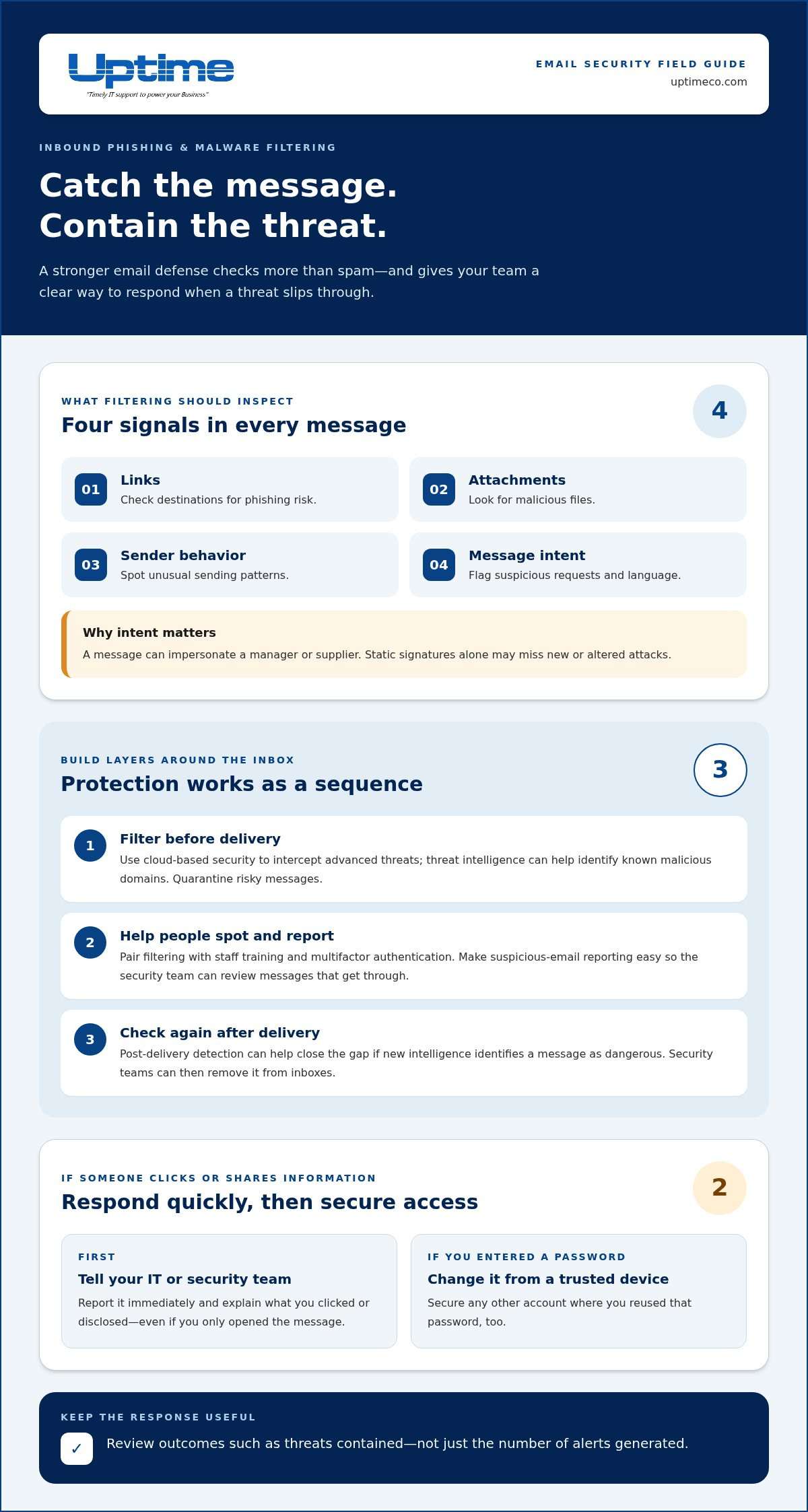
What steps can Brea businesses take to prevent phishing attacks? Use email filtering that checks links, attachments, sender behavior, and message intent. Pair it with staff training, multifactor authentication, and a clear process for reporting suspicious emails. Cloud-based security can intercept advanced threats before they reach inboxes, while threat intelligence helps identify known malicious domains.
Static signatures alone can miss new or altered attacks. Intent-based detection looks for suspicious requests, unusual language, and identity-based threats, such as messages impersonating a manager or supplier. Spam matters, too, because unwanted emails can contain malware or phishing links. Set filters to quarantine risky messages and make reporting easy, so security teams can review threats that slip through.
A phishing email may sit in an inbox for hours or days before someone clicks. Post-delivery detection helps close that gap: security teams can remove a message after new intelligence identifies it as dangerous. Encourage employees to report suspicious emails promptly, even if they’ve only opened the message.
What should you do after clicking a phishing link or sharing information in Brea? Tell your organization’s IT or security team immediately, and explain what you clicked or disclosed. If you entered a password, change it from a trusted device and secure any other account where you reused it.
Are there local Brea or Orange County resources for reporting phishing and cybercrime? Contact the Brea Police Department about suspected scams, and alert your workplace security team about business email incidents. For stronger email controls, explore cybersecurity planning as part of a proactive defense.
Enterprise phishing protection platforms
For a small or medium-sized business, the right platform connects email security with a response your team can use. Compare detection, remediation, workflow fit, and clear explanations of why messages are flagged.
Platform Features and Pricing Comparisons
Compare platforms on post-delivery detection, automated removal of malicious messages, and incident-response integration. Check whether employees can report suspicious emails through an abuse mailbox and whether protection can be tailored by role and risk. Find out how the platform explains its decisions, then assess outcomes such as threats contained, not just alerts generated.
Small businesses in Brea can compare managed IT and cybersecurity support with standalone email platforms. Consider how each option analyzes phishing attempts, handles compromised accounts, and coordinates response with your team. California obligations depend on the data handled, your organization’s role, and relevant sector or contractual requirements. Treat platform selection as one safeguard, not proof of compliance.
Phishing Protection Service Costs
How much do phishing protection and email security services cost in Brea? Costs depend on the requirements. Factors include mailbox count, deployment scope, integrations, monitoring, and response support. Compare proposals against the same needs to see what each package covers, rather than judging by a low starting price alone.
For practical protection against phishing attacks, choose a partner whose tools fit your email environment and whose response process is clear. Review your email security approach with those criteria in mind.
Uptime: Managed IT Services
Uptime Co. helps Brea organizations connect phishing protection with the IT systems and security workflows around it. Turn to Uptime when email defenses need to fit broader account, network, or cloud security, or when your team needs coordinated IT support rather than isolated tools.
Uptime’s Managed IT Services and Cybersecurity Solutions support the wider technology environment behind email security. Cloud Services and Network Infrastructure cover systems employees rely on, helping your organization consider protection as part of its overall setup.
Before choosing next steps, note how employees report suspicious messages, who reviews incidents, and which systems hold business data. This makes it easier to focus a discussion on your security priorities.
Contact Uptime Co. to discuss your organization’s needs.
Make Your Next Security Move Count
Turn your current email setup into a clear action plan. Identify who handles suspicious-message reports, how incidents reach decision-makers, and which business systems need priority attention. This gives your team a practical starting point before changing tools or workflows.
When evaluating Brea phishing protection services, focus on fit: how email defenses connect with daily operations, existing security tools, and incident response. A focused review can help identify gaps and decide what to address first, without adding complexity for its own sake.
Uptime Co. offers Managed IT Services, Cybersecurity Solutions, and Cloud Services to support broader technology and security needs. Contact Uptime Co. about phishing protection and take a clear next step toward a more coordinated security approach.
Frequently Asked Questions
What is Anti-Phishing?
Anti-phishing combines habits and security controls to reduce the chance that deceptive messages lead to stolen information or unauthorized access. For example, pause before approving a sign-in prompt you didn’t initiate, even if it appears while you’re working. Strong account authentication and a simple reporting process give employees clear steps when a message feels off.
Looking for the Right Solution to Phishing Threats?
Choose protection that fits your workflows, not just your inbox settings. Map how employees approve invoices, share files, and access accounts, then identify weak spots in those routines. A finance team may need clear procedures for payment changes, while a small office may need an easy way to report suspicious messages without disrupting daily work.
What phishing protection services are available in Brea, California?
Businesses comparing Brea phishing protection services can combine email safeguards with broader IT and security support. Uptime offers Cybersecurity Solutions and Managed IT Services to help organizations address phishing risks within their technology environment. The right approach depends on how your team uses email, which systems it relies on, and how security concerns are handled internally.
What phishing protection services are available for Brea residents and families?
For personal accounts, start with the safeguards in your email and financial account settings. Use a unique password for each account, enable multifactor authentication, and keep recovery details current. At home, agree on a quick way to verify urgent requests for money or account access, especially messages that appear to come from relatives but feel unusual.
What phishing protection features should businesses look for, such as email filtering and security awareness training?
When assessing Brea phishing protection services, look for filters that inspect links and attachments, along with clear tools for employees to report questionable messages. Security awareness training should use realistic examples, such as a fake shared-file notification or an unexpected sign-in prompt, and show staff what to do next. Consider whether administrators can review why a message was flagged and refine guidance accordingly.