
A weak website login, an unprotected file, or access that is never reviewed can expose your business’s valuable ideas. For small businesses in Brea, avoiding IT mistakes starts with securing accounts, backing up important files, and limiting access to sensitive information. These practical steps help reduce security risks and protect the work that sets your business apart.
You’re already juggling customers, deadlines, and daily decisions, so security can feel like one more complicated job. It doesn’t have to be. Strengthen website security, safeguard intellectual property, and build backup habits that make data loss less disruptive. Start with simple actions your team can maintain, without getting buried in technical jargon.
Key Takeaways
- Strengthen website and account security, especially if you accept payments or collect customer information.
- Use clear access controls and non-disclosure agreements to help keep valuable business ideas private.
- Build a backup routine and prioritize secure POS features to reduce the impact of lost or exposed data.
- When security and backup tasks become difficult to manage, Uptime’s managed IT and cybersecurity services can help support your business.
1. Website security and cybersecurity
A Mastercard survey found 46% of surveyed businesses had experienced a cyberattack. Nearly 20% of businesses that experienced an attack closed as a result, according to the survey. For Brea owners, a secure website matters especially when it supports commerce, collects customer information, or promotes products and services. Ignoring basic protections can put customer trust and business ideas at risk.
In-house IT can work when your team has the skills and time to manage security, updates, and support. A managed service provider can help when your business needs ongoing expertise without building that capacity internally. Compare who monitors access, handles security issues, and keeps systems running. Clear responsibilities matter more than the label.
California privacy and breach-notification requirements depend on the information your business collects and the rules that apply. Start with a data inventory: list customer details and payment information, and note where each type is stored. Include compliance review in your security planning instead of waiting until a breach forces the issue.
Prioritize business email, secure file storage, device access controls, and reliable backups. If your business sells online, include payment processing and a protected point-of-sale system in your plan. Give each employee an individual login so you can remove access promptly when roles change.
Install software updates that include security fixes, and replace computers when they can no longer run supported software or meet your needs. Track device condition and update status in one inventory. This gives your team a clear maintenance plan instead of relying on memory.
For local support, start with Brea or Orange County business organizations and small-business assistance programs. Ask about practical IT workshops or referrals, then use the guidance to build a cybersecurity plan suited to your audience and daily operations.
2. Protecting intellectual property
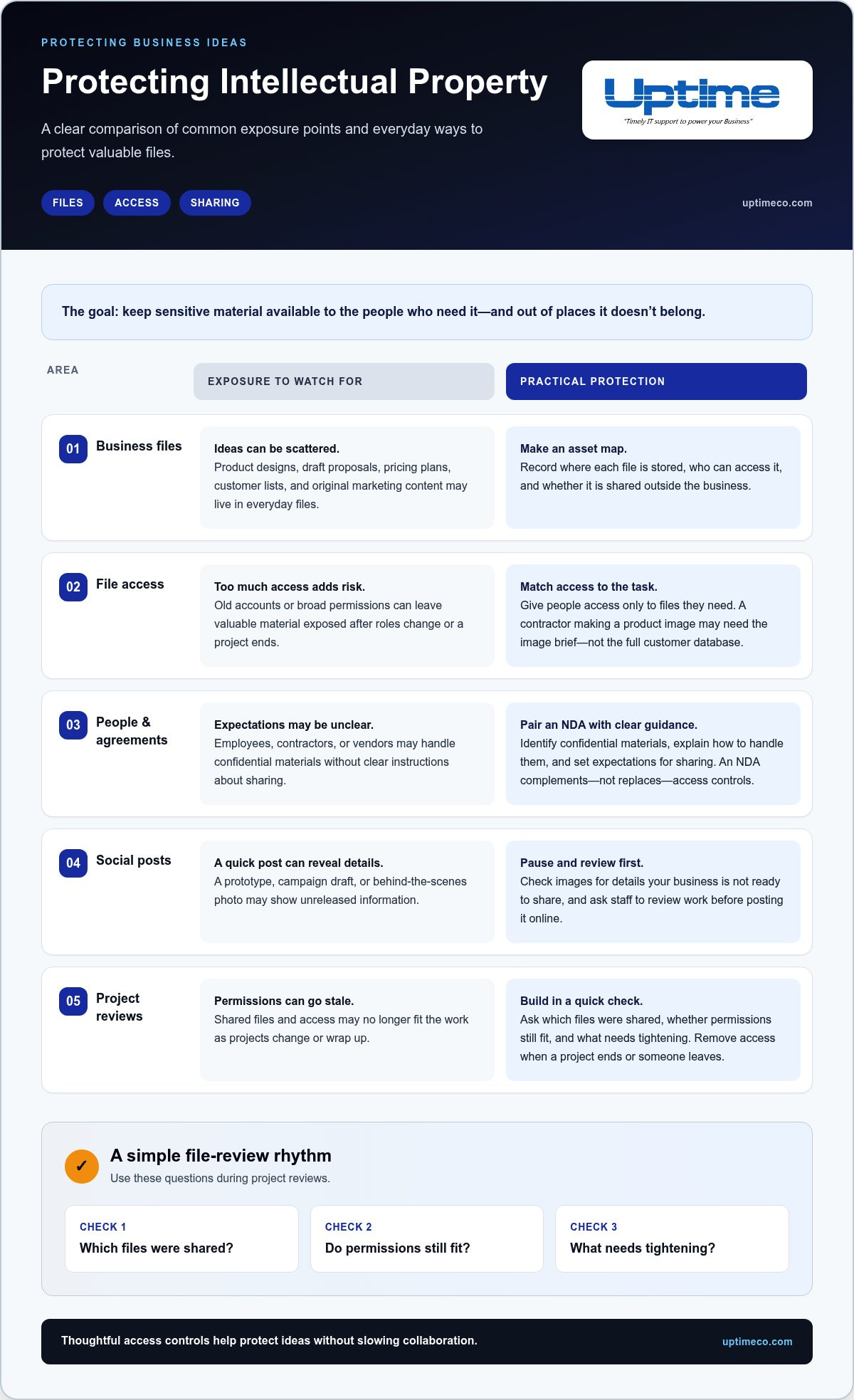
Valuable ideas may be stored in everyday files: product designs, draft proposals, pricing plans, customer lists, or original marketing content. Inventory these assets and record where each file is stored, who can access it, and whether it is shared outside your business. This map helps you spot exposure before a document spreads through email or social media.
Use access permissions to limit sensitive files to people who need them. For example, a contractor creating a product image may need the image brief, not your full customer database. Remove access when a project ends or someone leaves. Otherwise, old accounts can remain active and valuable material exposed.
Non-disclosure agreements can help protect intellectual property from disclosure by employees, contractors, and vendors. Pair an agreement with clear instructions: identify confidential materials, explain how to handle them, and set expectations for sharing. An NDA works best as part of a consistent process, not as a substitute for thoughtful access controls.
Social media creates another easy-to-miss risk. Before posting a prototype, campaign draft, or behind-the-scenes photo, check the image for unreleased details. Ask staff to pause before sharing work online. A post that isn’t reviewed can reveal information before your business is ready.
Make protection part of learning and feedback routines. During project reviews, ask which files were shared, whether permissions still fit, and what needs tightening. Maintaining that habit helps teams improve without slowing collaboration. If you need help securing access to digital business assets, explore practical cybersecurity support.
Protecting customers’ payment information helps small businesses build trust and meet applicable industry requirements. Include payment data in routine security reviews, and limit access to the people and systems that need it.
3. How can small businesses in Brea prevent data loss and back up files?
Start with a file inventory covering accounting records, customer orders, email, shared documents, and point-of-sale data. Note where each file is stored and who needs access. This map can reveal gaps, such as sales records kept only on one office computer. Set automatic backups for essential files, and keep a separate copy if your systems allow it. For small businesses in Brea, avoiding IT mistakes starts with knowing what needs protection.
A backup matters only if you can restore the files. Test a sample restore and confirm that documents open correctly and retain their contents. Assign someone to review backup status and investigate failed jobs. Keep a recovery guide with account details, system names, and the steps staff should follow after a device failure.
Protect backup accounts with strong, unique passwords, and limit access to people who manage recovery. Keep backup credentials separate from everyday work accounts. Include laptops used away from the office, since their local files may not automatically reach shared storage. Update the inventory when staff add devices or change how they work.
For payment systems, prioritize end-to-end encryption, PCI compliance, and data backup. Confirm that sales records and inventory information are included in your plan. After a point-of-sale update or system change, verify that backups still run and test a restore. Record the results so your team can spot a missed backup before urgent recovery is needed.
Build a recovery checklist: identify critical files, assign backup ownership, test restoration, and record the results. If you want help strengthening your backup and recovery plan, get support for business data protection.
Uptime: Managed IT Services
Uptime helps Brea businesses manage technology through Managed IT Services, Cybersecurity Solutions, Cloud Services, and Network Infrastructure. Turn to its team when security tasks, system upkeep, or planning reliable backups are pulling focus from daily operations. Managed support can help coordinate the tools and protections your business relies on, while cybersecurity services address risks to accounts, devices, and business data. Cloud Services can support file access and storage needs, and Network Infrastructure helps keep essential systems connected. Start by identifying the pressure point: recurring security concerns, hard-to-manage systems, or an IT setup that no longer fits how your team works. Visit uptimeco.com to connect with Uptime about your business’s IT needs.
Make your next IT move count
Protection improves when someone owns the next step. Rather than trying to fix every tool at once, identify a gap your team can address, assign responsibility, and set a time to review progress. For Brea small businesses, avoiding IT mistakes is an ongoing practice, not a one-time cleanup. Build habits your team can maintain as its work and technology change.
When you need hands-on support, Uptime offers Managed IT Services, Cybersecurity Solutions, and Cloud Services. Bring a short list of concerns, such as account access or backup routines, to keep the conversation focused on your priorities. Contact Uptime to discuss IT security and choose a practical next step. Small, steady improvements can help your team protect its work and move forward with confidence.
Frequently Asked Questions
What are the most common IT mistakes small businesses make?
Common mistakes include shared accounts, unmanaged software, and unclear responsibility for technology decisions. When several staff members use one login, it’s harder to identify unusual activity or remove access for one departing employee. Keep individual accounts, assign someone to review access, and document who approves new apps before your team adds them to its workflow.
What cybersecurity measures should a small business in Brea use?
Use multi-factor authentication, unique passwords, restricted user permissions, and current security tools. Start with email and financial accounts, since a compromised login can expose sensitive business information. Give each employee access only to the systems their role requires, and make security awareness part of onboarding. Uptime’s Cybersecurity Solutions can help businesses manage these protections, with security built into how Uptime manages technology.
How can small businesses avoid phishing and ransomware attacks?
Train staff to pause before opening unexpected attachments, entering credentials, or approving unusual payment requests. Verify payment or password-reset requests through a separate, trusted channel rather than replying to the message. If someone clicks a suspicious link, ask them to report it promptly and stop using the affected device until your response process can assess it.