
When an employee is stuck with a tech problem, every minute spent waiting for help pulls attention away from work. Remote IT support for business can often resolve common device, account, and software issues without an onsite visit. But speed is only part of the job: secure access and a clear plan for escalating problems matter too.
This guide explains what remote support can handle, how technicians can access business systems securely, and which problems may need hands-on attention. It also covers how remote help fits into managed IT, cybersecurity, cloud, network, and continuity needs. A useful first step when reporting an issue is to note the exact error message and what changed before it appeared. That information gives support a clearer starting point.
Key Takeaways
- Remote IT support for business can resolve common device, account, software, and connectivity issues without an onsite visit.
- A secure support flow includes reporting the issue, verifying the user and device, authorizing access, and documenting or escalating the outcome.
- Problems that require physical access to equipment may need hands-on attention.
- Help desk support can work alongside monitoring, cybersecurity, cloud management, and infrastructure administration to keep work moving.
What Remote IT Support for Business Includes, and What It Does Not
Remote IT support lets technicians diagnose and resolve technology issues over a secure connection, without traveling to an employee’s location. For a clear overview of the concept, see What is Remote Support? In a business setting, remote support can help with issues such as:
- A device that won’t connect to the company network
- Account access or login problems
- Software errors and setup questions
- A slow or misconfigured workstation
Remote help can spare an employee from waiting for an onsite visit, but it can’t fix every problem through a screen. A damaged device, disconnected cable, or other issue that requires physical access may need hands-on work or escalation. When reporting the problem, include the device name, the affected application or service, the error message, and whether anyone else is affected. This helps support distinguish an individual device issue from a wider outage.
Remote support software or a managed IT service?
Remote-access software creates a connection. By itself, it doesn’t provide a technician, a help desk, or a plan for what happens next. The people and processes behind that connection determine who responds, how the issue is handled, and when it needs to be escalated.
A staffed help desk gives employees a place to report problems and get assistance. Managed IT support connects day-to-day help with broader work such as network administration, cybersecurity, and cloud management. That wider view can help teams identify recurring issues rather than simply closing one remote session at a time. Explore the managed IT services guide for Brea businesses to see how support can fit into a broader IT plan.
How to Make Remote IT Support Secure, Useful, and Easy for Employees
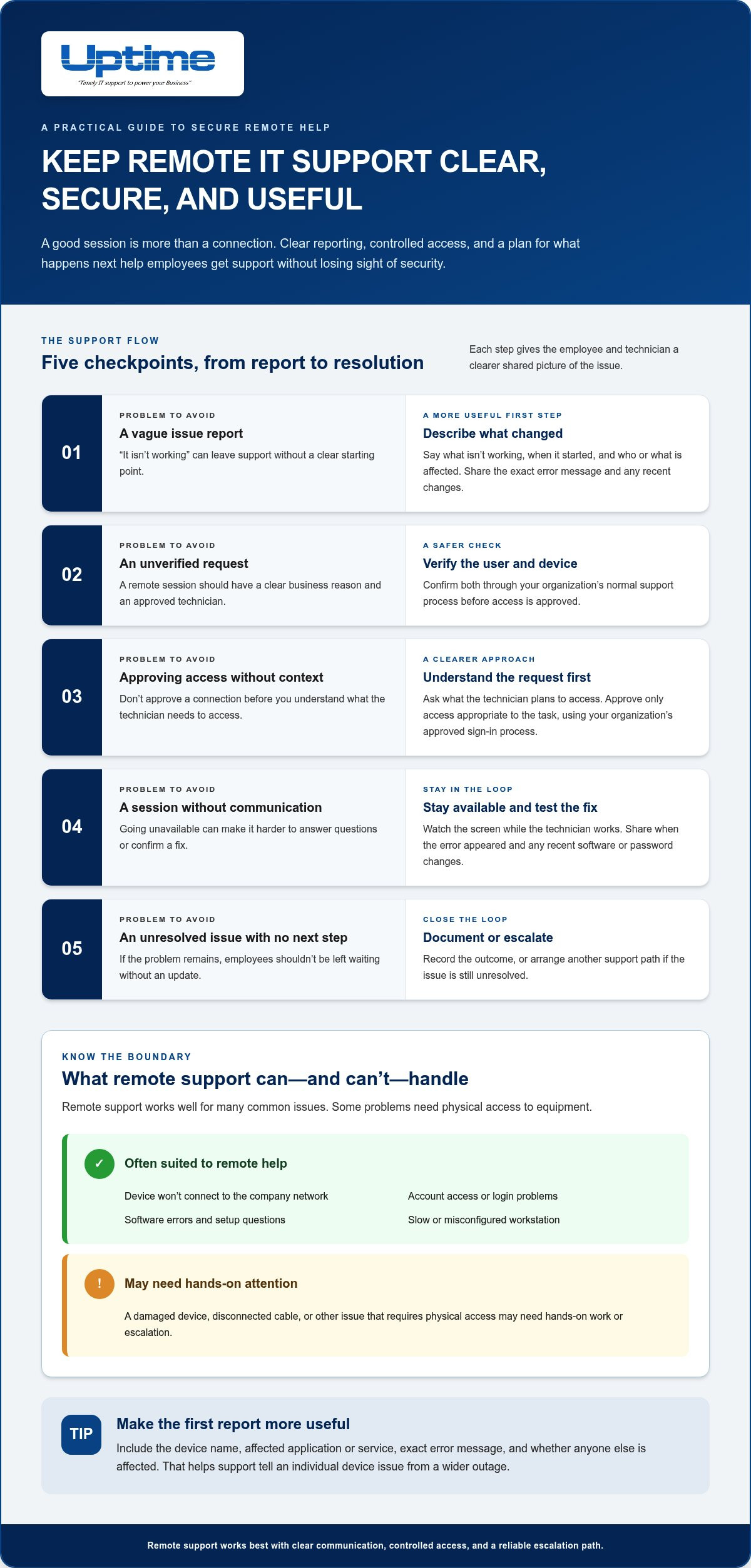
Secure remote support depends on controlled access and clear practices. Each session should have a business reason, an approved technician, and access appropriate to the task. Employees should know who is connecting and what the technician needs to see or change. Don’t share passwords in chat or email. Use your organization’s approved sign-in process instead.
A straightforward support flow keeps everyone on the same page:
- Report the issue: Describe what isn’t working, when it started, and who or what is affected.
- Verify: Confirm the user and device through the organization’s normal support process.
- Authorize access: Understand the request before approving a remote connection.
- Troubleshoot: Stay available to answer questions and test the fix.
- Document or escalate: Record the outcome or arrange another support path if the issue remains.
What should happen during a remote support session?
Before the session begins, ask what the technician plans to access. Stay available and watch the screen while they work. To help pinpoint the cause, share the exact error message, when it appeared, and any recent changes, such as a software update or password change. If the issue affects more than one person, mention that too. These details help focus troubleshooting and may reveal whether the problem is limited to one device.
Some problems need a different approach. A damaged device or an issue tied to equipment at a specific site may require hands-on attention. A clear escalation path tells employees what happens next, so they aren’t left waiting without an update.
Remote access is one part of a secure IT environment. For a wider view, read this Orange County cybersecurity services guide. Uptime Co. also connects day-to-day help with broader IT management through managed IT support.
When Remote IT Support Works Best as Part of Managed IT
Remote support is especially useful when employees work across locations, have recurring technology questions, or need help with an issue that doesn’t require physical access to a device. It gives a help desk a way to assist users while keeping the wider IT picture in view. For example, a login problem might involve account settings, cloud access, or a broader network issue. Looking at those connections can help support address the underlying cause instead of treating each symptom in isolation.
Connect everyday help with business continuity
Good support processes look beyond closing a ticket. They record recurring issues, note which systems depend on one another, and clarify when a problem should move to another level of support. That context helps teams respond consistently and plan for disruptions that affect access to important systems.
Recovery planning is part of that bigger picture. A support team that understands the business’s systems can connect day-to-day troubleshooting with backup and recovery considerations. For a closer look, read this backup and disaster recovery guide.
Uptime Co. brings help desk support together with managed IT, cybersecurity, cloud services, and infrastructure management. Based in Brea, the company serves businesses in Orange County and nationwide. Explore Uptime Co.’s IT services to see how connected support can fit your business.
Keep Your Team Moving with Connected IT Support
Remote IT support for business can resolve everyday technical issues without an onsite visit, but effective support involves more than making a remote connection. Controlled access, clear communication, and a reliable escalation path help employees get assistance while keeping security in view.
When help desk support connects with monitoring, cybersecurity, cloud management, and infrastructure administration, recurring problems can be understood in context. That gives your business a more coordinated way to manage technology and keep work moving.
Uptime Co. provides IT network administration and technology consulting, with proactive 24/7 network monitoring and help desk support. Its services support businesses, nonprofits, and public-sector organizations in Orange County and nationwide. Explore managed IT support for your business and take a practical next step toward connected IT management.
Frequently Asked Questions
Is remote IT support secure for a business?
It can be secure when access is controlled and the support process is clear. A technician should verify the user and device, explain what access is needed, and get authorization before starting a session. Stay available while they troubleshoot, and use your organization’s approved sign-in process. For businesses in Orange County, secure remote help can support employees working from the office or other locations.
What can remote IT support fix without an onsite visit?
Remote support can often help with device settings, account access, software issues, and network connectivity problems that don’t require physical access. For example, a technician may help resolve a login issue or troubleshoot a computer’s connection to a business network. Device damage, disconnected equipment, or site-specific issues may need hands-on support instead.
How is remote IT support different from remote access software?
Remote access software enables a technician to connect to a device, but it isn’t a support service on its own. Remote IT support for business also involves people who diagnose issues, communicate with employees, document work, and decide when to escalate a problem. With managed IT, help desk support can connect everyday requests to broader cybersecurity, cloud, and infrastructure needs.
Can a small business use remote IT support without an in-house IT team?
Yes. A small business can work with a managed IT provider for help desk support and ongoing technology management without building its own internal IT department. Uptime Co. supports small and medium-sized businesses, nonprofits, and public-sector organizations in Orange County and nationwide, combining help desk support with services such as network monitoring, cybersecurity, and cloud management.