

What if your network could flag trouble before it becomes an office-wide outage? Unexpected disruptions slow your team down, and a stream of technical alerts can make it hard to know what needs attention. That’s where 24/7 network monitoring services can help: they track system health and surface potential issues for review around the clock. For businesses in Orange County, that can mean a clearer view of the systems employees depend on every day.
Monitoring is most useful when an alert leads to a clear next step. You’ll learn what systems and activity continuous monitoring can track, what typically happens when a problem appears, and how monitoring fits with IT support and security operations. We’ll also cover what to look for in reporting and service arrangements, so you can compare options with confidence and find a managed approach that supports reliable day-to-day operations.
Key Takeaways
- See what 24/7 network monitoring services track, from system performance to alerts and potential risks.
- Understand the path from detecting a signal to assessing it and resolving the issue, with response expectations shaped by the service-level agreement.
- Learn how Uptime Co. brings monitoring together with IT support and security through Managed IT Services.
- Use transparent reporting to make better-informed decisions about system health, security, and technology priorities.
What 24/7 Network Monitoring Services Track, and Why It Matters
A network issue rarely comes with a clear explanation. A slowdown, failed connection, or unusual system alert can be an early sign that something needs attention. 24/7 network monitoring services continuously track system performance, health checks, alerts, and potential risks so a developing issue can be spotted and assessed, including outside business hours.
Monitoring can cover connected parts of your business environment, including networks, servers, workstations, and cloud services. The goal isn’t to promise zero downtime. It’s to give an IT team useful signals sooner, so it can investigate and respond before a fault disrupts more people or work. Organizations managing complex technical environments often turn to specialized providers like Athios for tailored IT solutions and support services that keep critical operations running smoothly.
What does proactive network monitoring mean in practice?
Proactive monitoring continuously tracks system performance, alerts, and potential risks so problems can be addressed before users are affected. Automated checks can show whether systems are responding as expected and flag changes for review. A Network Operations Center (NOC) coordinates this kind of ongoing visibility and monitoring.
Picture a shared server gradually slowing down. Monitoring may flag a performance change before employees notice delays opening files. The IT team can investigate and decide what action is needed, rather than waiting for help requests to pile up. Alerts are clues, not conclusions: a person still needs to assess what they mean.
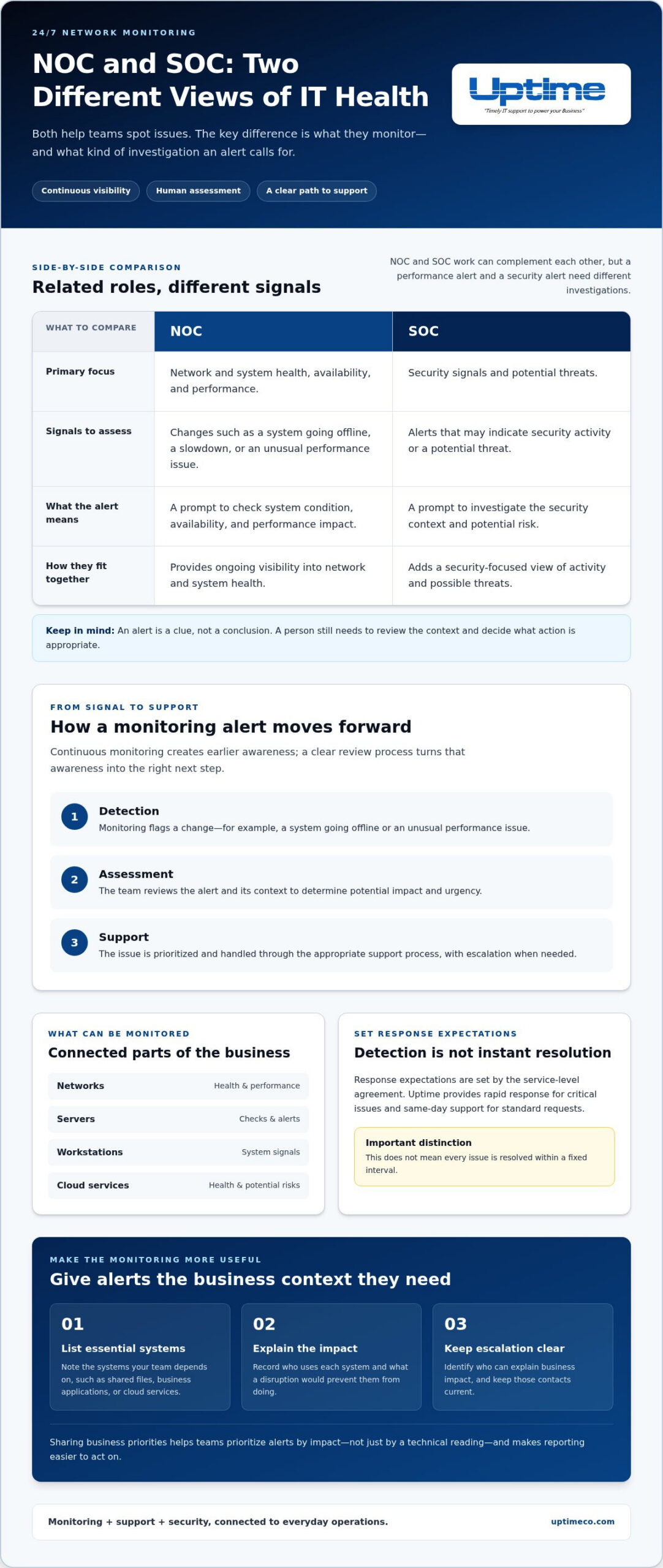
To make monitoring more useful, list the systems your team relies on for essential work, such as shared files, business applications, or cloud services. Note who uses each system and what a disruption would prevent them from doing. That context helps the IT team prioritize alerts by business impact, not just by a technical reading. It also makes reports easier to act on by connecting system health to the services employees rely on.
How 24/7 Monitoring Moves from Detection to IT Support
An alert is a starting point, not a fix. A clear process turns a technical signal into useful action without treating every notification as an emergency. With 24/7 network monitoring services, the workflow typically moves through three stages:
- Detection: Monitoring flags a change, such as a system going offline or an unusual performance issue.
- Assessment: The team reviews the alert, checks its context, and determines its potential impact and urgency.
- Support: The issue is prioritized and addressed through the appropriate support process, with escalation when needed.
Network Operations Center (NOC) monitoring and Security Operations Center (SOC) monitoring have related but distinct roles. A NOC focuses on network and system health, availability, and performance. A SOC focuses on security signals and potential threats. Their work can complement each other, but a performance alert and a security alert call for different investigations.
Does 24/7 monitoring mean every issue is fixed immediately?
No. Continuous monitoring can create earlier awareness, but detection doesn’t guarantee instant investigation or resolution. Response expectations are set by the service-level agreement. Uptime provides rapid response for critical issues and same-day support for standard requests. This does not mean every issue is resolved within a fixed interval.
Help escalation go smoothly by identifying the systems your business can’t operate without, naming the people who can explain their impact, and keeping those contacts current. For example, an alert affecting a shared business application may deserve a different priority from one involving a nonessential device. Clear context helps the team assess the issue and choose the right next step.
When monitoring is connected to hands-on support, alerts have a path forward. Uptime’s Managed IT Services bring monitoring, support, and security together as part of an ongoing approach to IT reliability for businesses in Orange County.
What Uptime’s Managed 24/7 Network Monitoring Looks Like
Monitoring is most useful when it connects to the people and decisions that keep your business moving. Uptime provides 24/7 network monitoring as part of Managed IT Services, alongside support and security. System signals can inform ongoing IT care instead of sitting in a dashboard without a clear path to action.
Transparent reporting gives you measurable insight into system health, security, and service performance. Use it to spot recurring issues, understand where attention is needed, and see how technology supports daily operations. A report is more than a technical snapshot. It can help business leaders make informed choices about priorities, risks, and future investments.
How can a business get more value from monitoring?
Connect system health findings to business priorities. If a system supports customer service or financial operations, its reliability may matter more than a less essential tool. Share those priorities with your IT team so reports and recommendations reflect how your business actually works.
Uptime’s dedicated vCIO team helps align technology planning with business goals and build a technology roadmap. That guidance can turn monitoring insights into focused planning, such as deciding which recurring problems deserve attention or where a technology investment fits. Explore Uptime’s Managed IT Services to see how monitoring, support, security, and technology guidance work together.
Uptime serves businesses in Orange County, including Irvine, Tustin, Garden Grove, Anaheim, and Orange. To get more value from reporting, bring a short list of business priorities to technology-planning conversations. It gives your vCIO a useful starting point and connects system health to the outcomes your team needs.
Make Reliability Part of Your Next IT Decision
Strong IT planning starts with a useful question: what would help your team work with more confidence tomorrow? Consider where technology friction slows routine tasks, creates uncertainty, or makes it harder to serve customers. Uptime brings over 30 years of proactive IT management and technology support to those conversations, alongside 24 × 7 × 365 Network Operations Center monitoring and 24 × 7 SOC monitoring.
Before your next planning discussion, ask your team to name one recurring technology frustration and one improvement that would make a real difference. For example, note whether a slowdown affects a shared application, a network connection, or access to files. That simple exercise can turn a broad goal like “better IT” into a practical next step.
Talk with Uptime about proactive, business-focused IT support for your Orange County business and take a confident next step toward smoother operations.
Frequently Asked Questions
What should a small business prioritize when setting up network monitoring?
Start with the systems whose loss would interrupt core work, such as order processing or access to shared records. Create a simple inventory showing who uses each system, what other tools it depends on, and which contact can explain its business impact. Review the inventory after major staffing or software changes so priorities stay grounded in daily operations. For smaller organizations seeking comprehensive outsourced IT management, providers like JOB Technologies offer tailored support to help maintain and protect vital infrastructure.
Does network monitoring replace data backups?
No. Monitoring helps you see system issues, while backups preserve data for recovery after loss or disruption. They solve different problems. For example, monitoring might flag a server issue, but it can’t restore a file someone deleted. Pair monitoring with a backup and recovery plan, and make sure your team knows how to access recovery guidance when needed.
Is 24/7 network monitoring useful for a small business?
It can be, especially if your team relies on connected systems to serve customers, manage schedules, or handle payments. 24/7 network monitoring services aren’t only for large enterprises. The useful scope depends on which systems matter most to your operations. Uptime provides Managed IT Services for small and mid-sized businesses, bringing monitoring together with support and security.
How is network monitoring different from antivirus software?
Network monitoring gives a broader view of system availability, performance, alerts, and potential risks across an IT environment. Antivirus or endpoint protection focuses on detecting and addressing threats on protected devices. For example, a device may be online but still have a security threat that endpoint protection needs to handle. Use both as distinct parts of an overall IT and security approach.


