

What if your network could reveal a problem before it disrupts a workday? A dropped connection, unstable Wi-Fi, or security gap can interrupt staff and customer work while your internal team is juggling other priorities. Managed network services provide ongoing oversight and support, but the right scope depends on how your business operates.
Start by identifying what needs monitoring, who handles maintenance and security, and how network health is reported. This guide explains what managed network services can cover, how to assess your needs, and what to clarify about support. You’ll also see how Uptime Co. connects network analysis and security assessment with broader managed IT support, including 24/7/365 Network Operations Center monitoring. Use the checkpoints ahead to spot gaps and keep technology aligned with your business needs.
Key Takeaways
- Map the network systems your team depends on and note where disruptions slow work or affect customers.
- Use managed network services to define what’s monitored, maintained, secured, and supported, along with what remains your team’s responsibility.
- Compare service coverage by looking at security integration, reporting, vendor coordination, and support arrangements.
- Connect network oversight with broader IT planning to get a clearer view of technology health and business priorities.
What Managed Network Services Cover, and What Your Business Still Controls
Managed network services provide ongoing monitoring, maintenance, security oversight, and support for the technology that connects your business systems. Rather than waiting for staff to report every slowdown or outage, a provider can monitor network health and use alerts to flag potential issues. The goal is to identify problems early, not to promise that every disruption can be prevented.
Managed network services are ongoing oversight and support for a business’s network, with responsibilities agreed between the business and its provider. They are one part of managed services, a broader model in which an outside provider handles agreed technology functions, as outlined by Managed Services Wikipedia.
Keep the boundaries clear. Network operations focus on the infrastructure and connections that keep systems communicating. Broader managed IT may include end-user support and device management; cloud services cover cloud environments; cybersecurity addresses protection across systems and data. These areas can work together, but the scope and escalation path should be explicit. Your business still sets operational priorities, approves decisions that affect staff or customers, and identifies who should be notified when an issue needs escalation.
Which network tasks can an MSP oversee?
An MSP can oversee network monitoring and maintenance, support network infrastructure, and assess network security. Uptime Co. provides network infrastructure, network analysis, and security assessment as part of its managed IT and security capabilities. Continuous health checks and alerts help surface potential issues before they affect users, so teams can investigate with more context.
- List the network systems and locations your team relies on.
- Agree who handles routine maintenance and who approves significant changes.
- Define where alerts go, who owns follow-up, and when an issue is escalated.
Write these boundaries down. A clear division of responsibility helps your internal team stay focused while keeping you informed about network decisions that affect day-to-day work.
How to Evaluate Managed Network Services for Your Business
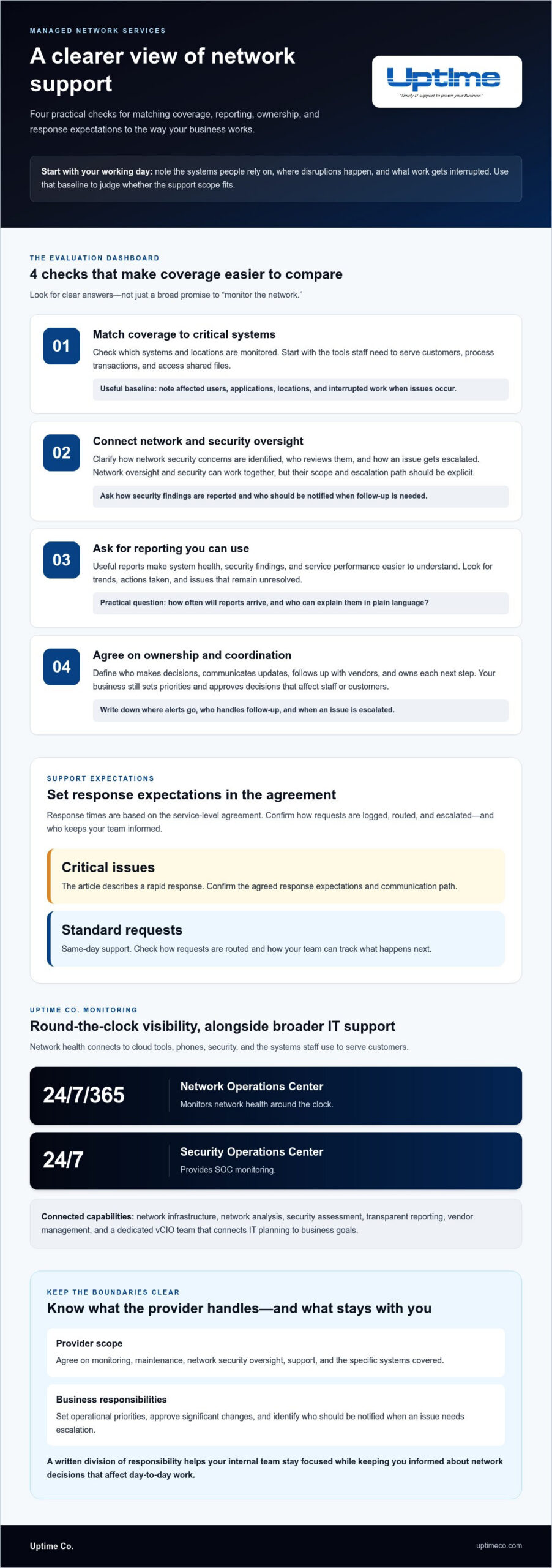
Start with a typical working day. List the systems staff need to serve customers, process transactions, or access shared files. When a slowdown or dropped connection occurs, note the affected users, applications, and location, along with what work was interrupted. This creates a practical baseline for judging whether support matches your business priorities.
Next, look beyond the promise to “monitor the network.” Find out which systems and locations are covered, how security fits into network oversight, and what reports show. Useful reporting should make system health, security findings, and service performance easier to understand. Map vendor coordination, too: if an issue involves an internet provider or another technology vendor, clarify who follows up and keeps your team informed.
- Check that monitoring coverage reflects the systems your staff rely on.
- Review how network security concerns are identified and escalated.
- Look for reports that show trends, actions taken, and unresolved issues.
- Define who owns decisions, communicates updates, and coordinates vendors.
Questions that reveal whether network support fits
Ask how often you’ll receive reports and who can explain them in plain language. Find out how support requests are logged, routed, and escalated, and how response expectations are set. Response times are based on the service-level agreement: critical issues receive rapid response, and standard requests receive same-day support. Make sure the agreement identifies responsibilities and communication paths, so your team knows what happens next.
For a small or mid-sized business, start with four checks: match coverage to critical systems, connect network and security oversight, ask for clear reporting, and agree on ownership, vendor coordination, and support expectations. Compare the service against your baseline rather than relying on broad assurances. Learn how Uptime Co. approaches network oversight as part of business IT through Uptime Co.’s network services.
How Uptime Co. Connects Network Oversight to Reliable Business IT
Network performance is connected to the rest of your business. A connection issue can affect cloud tools, phones, security, and the systems your staff use to serve customers. Uptime Co. brings network infrastructure, network analysis, and security oversight into a broader managed IT approach, helping you understand how these pieces fit together.
Uptime Co.’s Network Operations Center monitors network health 24/7/365, and its Security Operations Center provides 24/7 SOC monitoring. Transparent reporting gives you insight into system health, security, and service performance. Vendor management helps coordinate technology relationships, while a dedicated vCIO team connects IT planning to business goals. Together, these capabilities help clarify what needs attention and how it affects operations.
For businesses utilizing managed network services, local context matters. Uptime Co. serves businesses in Irvine, Orange, and Anaheim, among other listed California communities. A useful plan reflects how your teams work, which systems are critical, and where your business is headed, not just what equipment is on the network.
Turn network visibility into a clear next step
Start with an IT assessment and planning discussion. Review recurring issues, current network needs, security priorities, and upcoming business changes. This can help identify what to address first and shape a technology roadmap around your priorities. Network oversight can also connect to managed IT services as part of a wider business technology plan.
Before the discussion, gather examples of recurring network problems, note which teams and systems they affect, and list any changes your business is planning. That gives the team a practical starting point for understanding your network needs and how support can fit your operations.
Make Your Network Plan Work for What’s Next
Growth brings new demands on your technology. As you plan your next business milestone, consider what your network will need to support, from new ways of working to changing customer expectations. Bring those priorities into technology planning so network decisions keep pace with your business.
Uptime Co. brings over 30 years of IT management and technology consulting experience to business technology planning. Share your priorities and discuss how network support can fit your wider IT needs, with clear responsibilities and practical next steps. Talk with Uptime Co. about managed network support.
Frequently Asked Questions
What are managed network services?
Managed network services are an ongoing arrangement for supporting and maintaining a business’s network, rather than a one-time installation or repair. The service agreement defines which network components are covered, what work the provider handles, and how your staff stays involved. A network upgrade may be a project; ongoing support addresses the network after the change.
What does a managed network services provider monitor?
The scope can include network infrastructure and connected systems. Broader IT support can also extend to servers, workstations, cloud services, cybersecurity, backups, and help-desk support. For example, if staff can’t reach a shared application, the issue may involve network connectivity or another system. A written coverage list helps your team understand what’s included and where investigation should start.
Can managed network services work alongside an internal IT team?
Yes. An internal IT team and an outside provider can divide responsibilities to suit your business. Your staff might handle user requests and business-specific technology decisions, while the provider supports agreed network operations and security work. Assign an owner to each task and define the escalation route, so an issue doesn’t stall while both teams assume the other is handling it.
How do I know if my business needs managed network services?
Consider outside support if recurring network issues keep pulling employees away from their main work, or if routine maintenance depends on one busy team member. A planned expansion can also reveal gaps in current support. Review recent IT requests and note what caused each delay. Uptime works with small and mid-sized businesses in Orange County, California.


