

Technology spending without a business goal is just spending. Strategic IT planning in Brea connects technology choices to business priorities, so investments support the outcomes that matter. Start by understanding your current IT environment, then turn priorities into a focused roadmap.
Technology affects how your business operates, grows, and manages risk. The challenge is deciding what to address first and how each investment supports the bigger picture. This guide explains what strategic IT planning involves, how to align technology decisions with business goals, and why an honest assessment of your systems is the best place to begin. You’ll gain a clearer way to weigh priorities, trade-offs, and next steps.
Key Takeaways
- Define business priorities first, then use them to guide technology decisions.
- Rank IT investments by their impact on goals, risk, and day-to-day operations.
- Assess your systems, security, and infrastructure to spot gaps before building a roadmap.
- Use managed IT support when you need help turning technology priorities into a practical plan.
What is IT Strategic Planning?
IT strategic planning links technology choices to business priorities and organizes them into a practical roadmap. For businesses in Brea and Orange County, it clarifies what to fund, what to improve, and how to measure progress.
Prioritizing Technology Investments
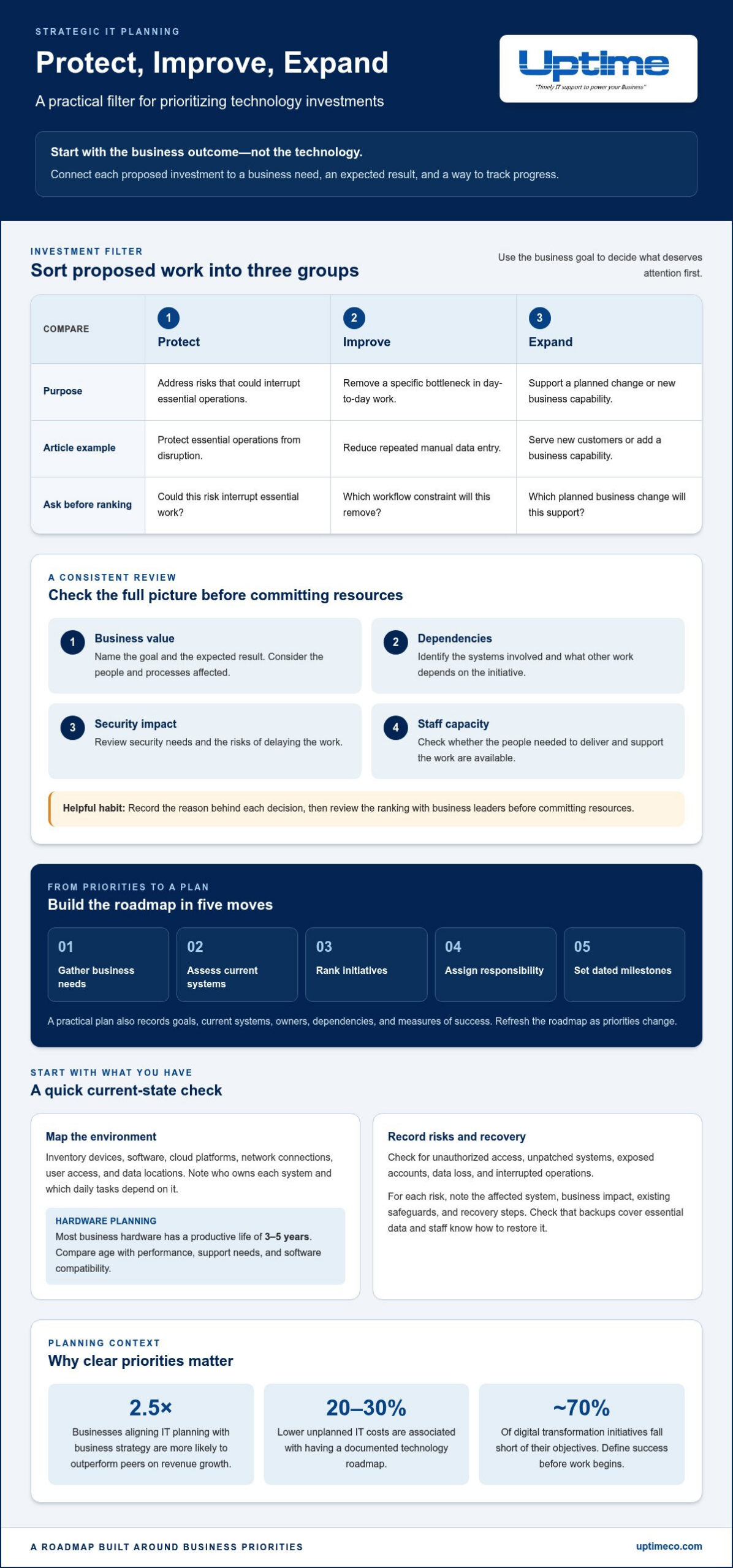
Technology investment prioritization ranks projects by their contribution to business goals, risk reduction, and operational needs. This prevents urgent requests from automatically taking the lead. Compare each initiative’s business value, dependencies, security impact, and staff capacity. For example, upgrading software that blocks a core workflow may be more important than adding a feature with limited business impact. Record the reason for each decision.
Technology Strategic Planning
Strategic IT planning turns business objectives into coordinated decisions about systems, software, cloud services, and networks. A roadmap gives projects a shared direction. For a local example of planning around stakeholder priorities, Brea Envisions gathered community input over two years for a draft Community Strategic Plan. Businesses can apply the same listening principle by involving the teams that rely on technology every day.
A dedicated innovation fund can give promising technology ideas a clear path from proposal to review. Set criteria for business value, security, feasibility, and alignment with the roadmap before approving experiments.
Strategic Plan Contents and Timeline
A strategic IT plan outlines business goals, current systems, prioritized initiatives, owners, dependencies, milestones, and measures of success. These elements help small and midsize businesses connect projects to outcomes. Build the plan by gathering business needs, assessing systems, ranking initiatives, assigning responsibility, and setting dated milestones. Refresh the roadmap as priorities change instead of treating it as a one-time document.
Privacy Rules Affecting IT Planning
California privacy requirements may apply depending on a business’s activities and the personal information it handles. Federal requirements can also depend on its industry and records. These factors influence decisions about data storage, software access, retention, and security controls. Inventory the information you hold, where it moves, and who can access it. Then map relevant requirements to systems and responsibilities before planning cloud or network changes.
Aligning IT investments with business goals
Start with the business outcome, not the technology. For example, a Brea company aiming to shorten order processing can compare software and workflow changes by how well they support that goal. This keeps appealing upgrades from outranking projects that address real operational constraints.
Businesses that align IT planning with business strategy are 2.5 times more likely to outperform peers on revenue growth. A documented technology roadmap is associated with 20-30% lower unplanned IT costs than operating without one. These figures point to a practical discipline: connect each proposed investment to a business need, expected result, and way to track progress.
Use a consistent review for each initiative. Identify the business goal, the people and processes affected, the systems involved, and the risks of delaying the work. Then compare expected value, dependencies, security needs, and available staff capacity. Roughly 70% of digital transformation initiatives fall short of their objectives, so define what success means before a project begins. For example, a customer-service upgrade might be measured by reduced manual handoffs, not simply by software deployment.
Managed IT services and in-house IT differ in how technology work is staffed and coordinated. In-house teams provide direct internal ownership. Managed services add an external team for agreed IT responsibilities, while business leaders retain control of priorities and outcomes.
To connect investments to growth, sort proposed work into three practical groups:
- Protect: Address risks that could interrupt essential operations.
- Improve: Remove a specific bottleneck, such as repeated manual data entry.
- Expand: Support a planned change, such as serving new customers or adding a business capability.
Review the ranking with business leaders before committing resources. This turns the technology roadmap into a shared decision-making tool.
Assessing the current IT environment
A useful assessment starts with an inventory, not a shopping list. Map business devices, software, cloud platforms, network connections, user access, and data locations. Note who owns each system and which daily tasks depend on it. For example, identify the tools employees need to process orders or access customer records. This map can reveal bottlenecks, overlapping tools, and single points of failure before you plan upgrades.
Cybersecurity and disaster recovery risks include unauthorized access, unpatched systems, exposed accounts, data loss, and interrupted operations. For each risk, record the affected system, business impact, existing safeguards, and recovery steps. Check whether backups cover essential data and whether staff know how to restore it. Review security regularly so changes to systems, access, and business processes inform future priorities.
Equipment age matters, too. Most business hardware has a productive life of 3-5 years, so plan replacements before failure disrupts work. Compare device age with performance, support needs, and compatibility with the software employees rely on. Review network capacity alongside cloud applications, since slow connections can undermine otherwise capable systems. A practical tip: track assets in one register with an owner, business use, condition, and planned action for each item.
Turn findings into a prioritized risk register. Flag issues that could halt essential work, expose sensitive information, or prevent recovery; then assign an owner and a next action to each. Keep the record current as systems and business needs change. For focused help assessing security exposure and recovery readiness, discuss cybersecurity and disaster recovery planning.
Uptime Co.: Managed IT Services
Uptime Co. provides Managed IT Services to help businesses put technology priorities into practice. Turn to managed support when your internal team needs help coordinating IT work, strengthening security, or planning infrastructure changes. Cybersecurity Solutions can support security priorities, while Cloud Services and Network Infrastructure help guide decisions about where systems run and how teams connect.
Start with an assessment. Identify the business goals, risks, and systems that need attention, then use those priorities to guide the conversation. Uptime Co. can connect that picture to relevant technology support. If your internal team has the capacity and expertise to manage upcoming needs, keep ownership in-house and revisit the plan as priorities change.
Contact Uptime Co. to discuss your technology priorities.
Put Your IT Roadmap in Motion
Your next move doesn’t need to be a major overhaul. Choose one business priority, connect it to a technology decision, and assign a clear owner. That small commitment can turn planning into steady progress. Strategic IT planning in Brea is most useful when it stays connected to decisions your team makes as the business changes.
When you’re ready to shape your plan, Uptime Co. provides Managed IT Services, Cybersecurity Solutions, and Cloud Services to support business technology needs. Bring your goals and current challenges to the conversation, then explore the support that fits your direction.
Contact Uptime Co. about IT planning and take the next step with focus. Your roadmap can start with one practical decision.
Frequently Asked Questions
What is strategic IT planning for businesses in Brea, California?
For a Brea business, strategic IT planning connects technology decisions to the company’s direction. It helps leaders decide which capabilities to build, maintain, or retire as customer needs and operations change. For example, a business preparing to add online services can assess whether its current tools support that experience before committing to new platforms.
How can businesses align IT planning with business goals and budgets?
Start with the outcome each department needs, then group technology requests by how directly they support it. For a Brea business opening a new service line, map the required systems, staff training, and ongoing support before setting budget priorities. Separate essential work from optional enhancements, and revisit allocations when revenue plans or operating needs change. This makes trade-offs clear to decision-makers.
How should businesses assess their current IT infrastructure before planning upgrades?
Look beyond equipment and software. Trace a key business process, such as onboarding a new employee, through accounts, approvals, devices, and data. Note where teams rely on manual workarounds, duplicate information, or one person’s knowledge. Then review vendor dependencies and support arrangements. This process-level view helps Brea businesses uncover upgrade needs that a hardware inventory alone can miss.


