

Ransomware prevention starts before an attacker reaches your files. For businesses in Brea, it means reducing the ways attackers can get in and limiting the damage they can cause. The Cybersecurity and Infrastructure Security Agency recommends unique passwords of at least 15 characters to help reduce risks from compromised credentials.
Stopping suspicious emails is important, but no single safeguard can prevent every ransomware attack. Effective ransomware prevention combines access controls, reliable recovery options, and clear steps for your team to follow. This guide explains how offline, encrypted backups, recovery testing, network segmentation, and least privilege work together, with practical ways to strengthen your defenses and identify gaps.
Key Takeaways
- Learn how to make backup copies harder for attackers to reach and tamper with.
- Find out why recovery drills matter, and what to check before restoring systems.
- See how separating network areas can help contain an intrusion.
- Review practical ways to limit user and device access to the systems each one needs.
1. What is Ransomware Prevention?
Ransomware prevention means reducing the chance attackers can enter, spread, and lock business files. For ransomware prevention in Brea, combine secure access, protected systems, employee awareness, and a tested backup plan. The Cybersecurity and Infrastructure Security Agency recommends unique passwords of at least 15 characters to reduce ransomware risks from compromised credentials.
Layer protections across your security setup. Filter malicious links in email, block unsafe websites, and use endpoint protection to detect suspicious activity. Monitor unusual logins and file changes, too. For example, an alert for unexpected file renaming can help your team respond before the activity spreads to more systems.
Protect remote access with multifactor authentication, especially for email, VPNs, and accounts that can reach critical systems. Inventory your computers, software, cloud tools, and user accounts, then remove anything outdated or unnecessary. Apply secure configurations and updates to reduce known weaknesses.
Train employees to pause before opening unexpected emails or attachments. Use a realistic example, such as a delivery notice asking for a password, and show staff how to report it.
Small businesses can layer email filtering, endpoint protection, multifactor authentication, and backups. Each addresses a different risk, so don’t rely on a single tool to protect the business.
After an attack, preserve evidence and assess whether personal information was accessed. California notification duties depend on the information involved and the incident facts, so document what you find promptly.
To protect Microsoft 365, enable multifactor authentication, filter suspicious emails, restrict account permissions, and review sign-in alerts. Keep a separate backup of important cloud files.
Brea businesses can use managed IT and cybersecurity support to configure safeguards and coordinate incident response.
If you suspect an infection, disconnect affected devices from the network, alert your IT response team, and preserve logs. Don’t delete files or restore backups until the affected systems and backup integrity have been assessed.
2. Offline encrypted backups and recovery testing
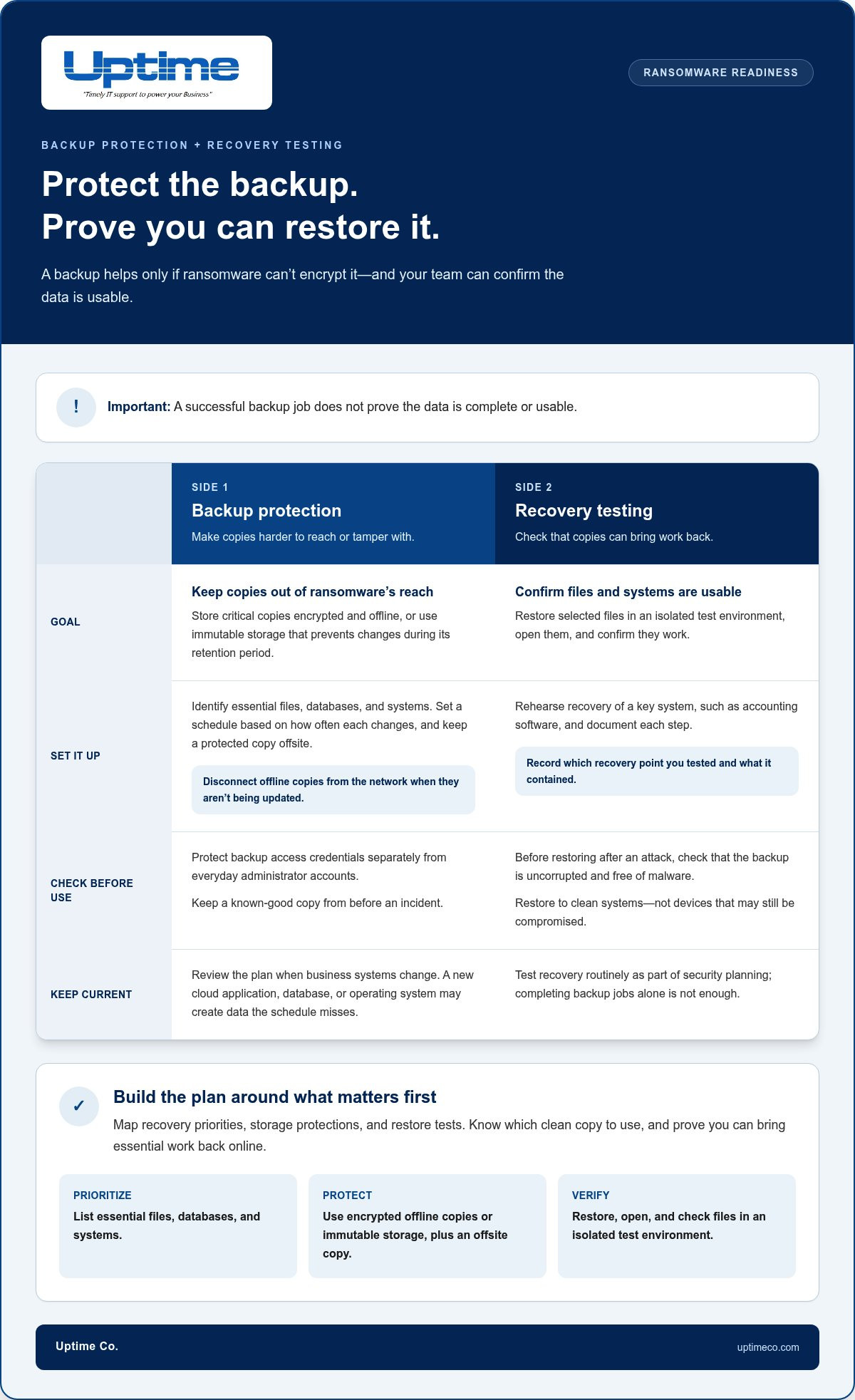
A backup helps only if ransomware can’t encrypt it along with your working files. For ransomware prevention in Brea, keep critical copies encrypted and offline, or use immutable storage that prevents changes during its retention period. Disconnect offline copies from the network when they aren’t being updated.
Build your backup plan around what the business needs to restore first. Identify essential files, databases, and systems, then set a schedule based on how often each changes. Store a protected copy offsite so a local incident affecting a device or infrastructure won’t take every copy with it.
Test recovery, not just whether backups complete. Restore selected files to an isolated test environment, open them, and confirm they work. Then rehearse recovering a key system, such as accounting software, and document each step. A successful backup job doesn’t prove that the data is complete or usable.
Before restoring after a ransomware attack, check that the backup is uncorrupted and free of malware. Restore to clean systems, not devices that may still be compromised. Keep a known-good copy from before the incident, and document which recovery point you tested and what it contained.
Review the plan whenever business systems change. A new cloud application, database, or operating system may create data the existing schedule misses. Include backup access credentials in recovery planning, but protect them separately from everyday administrator accounts. These checks make backup readiness part of routine security planning.
Use backup and disaster recovery planning to map recovery priorities, storage protections, and restore tests. Know which clean copy to use, and prove you can bring essential work back online.
3. Network segmentation and least privilege
Divide your network into zones, such as office devices, servers, and guest Wi-Fi. If a malicious file reaches one endpoint, segmentation can limit its path to other systems. Give each zone only the connections it needs, and review those rules as your software and infrastructure change.
Least privilege limits access for employees and service accounts. Give each person permissions suited to their role, rather than blanket administrator rights. Remove access when responsibilities change, and review accounts for former staff, unused applications, and shared logins. Limiting permissions can reduce what attackers can do with stolen credentials.
Remote access needs focused controls. The Cybersecurity and Infrastructure Security Agency identifies TCP port 3389 as the port used by Remote Desktop Protocol in its example of a port to disable when it is not needed for business. Restrict remote connections to approved users and secure access methods. Update exposed systems promptly.
Make network activity visible by monitoring logins, endpoint alerts, and unusual traffic between zones. For example, unexpected requests from a workstation to a file server may signal malicious activity. Set alerts for suspicious patterns, and make sure someone knows how to escalate them into incident response.
Network controls can block known malicious destinations and traffic with no business purpose. Combine them with phishing filters and account monitoring. A fake sign-in email may steal an employee’s credentials; limited permissions and segmented systems can help contain the resulting breach.
Map your accounts, devices, and network connections before changing access rules. An inventory helps identify unnecessary pathways without disrupting essential work. Use it to test one zone at a time, confirm legitimate applications still connect, and refine your response process before an incident creates pressure.
Uptime: Managed IT Services
Uptime Co. helps businesses turn ransomware prevention steps into a practical security plan. Its Managed IT Services and Cybersecurity Solutions can support reviews of user access, network protections, and security priorities. This is a useful next step if your team needs help tracking access changes, reviewing alerts, or coordinating security work across systems.
Bring a current list of users, devices, and applications to the conversation. It provides a clear starting point for identifying unnecessary access and planning network controls. Uptime Co. also provides Network Infrastructure and Cloud Services to support business technology needs.
Contact Uptime Co. to discuss cybersecurity support for your Brea business.
Make Security Part of the Routine
Strong protection isn’t a one-time project. Make security ownership part of everyday operations: assign responsibility for reviewing changes, tracking unresolved alerts, and keeping response plans current. When your business adds staff, software, or new ways of working, revisit who can access what and whether existing safeguards still fit.
That steady routine helps ransomware prevention in Brea keep pace with your business instead of sitting on a checklist. Start by assigning one security task this week, then set a regular time to review progress. Consistent improvements make it easier to spot gaps before they become urgent.
Ready to discuss practical next steps for your organization? Contact Uptime about protecting your business. Take the next step with clarity and build a stronger security routine.
Frequently Asked Questions
What is Ransomware Prevention?
Ransomware prevention means reducing attackers’ opportunities before they disrupt files or systems. Think of it as a chain: an employee spots a fake invoice, email controls flag its attachment, and access limits restrict what a compromised account can reach. Each step can interrupt a different part of the attack.
Can Antivirus Help with Ransomware?
Yes. Antivirus can help detect or block malicious files on a computer, but it can’t cover every way ransomware can enter. For example, a stolen password may let an attacker sign in without triggering a file alert. Pair endpoint protection with secure account access, email safeguards, and a plan for reporting suspicious activity.
What are the most effective ways for Brea businesses to prevent ransomware?
For ransomware prevention in Brea, prioritize the access points your team uses every day: email, remote connections, and shared business applications. Require multifactor authentication, limit administrator permissions, and remove accounts people no longer need. Keep an inventory of devices and software so your team can identify systems needing attention and route alerts to someone responsible.
What backup strategy and recovery steps protect against ransomware?
Start recovery by identifying the systems that support essential work, such as payroll, scheduling, or customer records. After isolating affected devices, confirm the restoration copy is clean and usable. Restore the most critical services first, then check that users can access the records and applications they need before returning systems to normal operations.
How should Brea organizations train employees to recognize ransomware and phishing?
Use short, realistic examples drawn from everyday work: an unexpected invoice, a shared-document notice, or a request to sign in again. Teach employees to inspect the sender and destination before clicking, avoid unexpected attachments, and report suspicious messages through a clear internal channel. Review reported examples together so staff know what to do next time.


