

The cheaper IT option can become the costlier one when a sudden outage pulls staff away from work. If you’re weighing break-fix vs managed it services, the appeal of paying only when something breaks is real, especially during quiet months. But invoices don’t show the full picture: downtime, repeat issues, and routine maintenance all affect what your team actually spends.
The right fit depends on more than the monthly bill. This guide compares what each model covers, how costs and risks show up day to day, and when ongoing monitoring and help desk support can bring more predictability. You’ll also get a practical way to review your last 12 months of repair bills and downtime, then decide what makes sense for your Orange County business. Start with the interruptions your team can least afford. They often reveal what your current setup is missing.
Key Takeaways
- Use the break-fix vs managed it services comparison to decide whether your business needs on-demand repairs or ongoing support.
- Compare each model by incident frequency, downtime impact, in-house IT capacity, and the support your team expects.
- Review repair invoices alongside maintenance gaps and disruptions to get a clearer picture of your current approach.
- See how monitoring, help desk support, and infrastructure management work alongside cybersecurity, cloud, and backup services.
Break-Fix vs. Managed IT Services: What Does Each Model Actually Include?
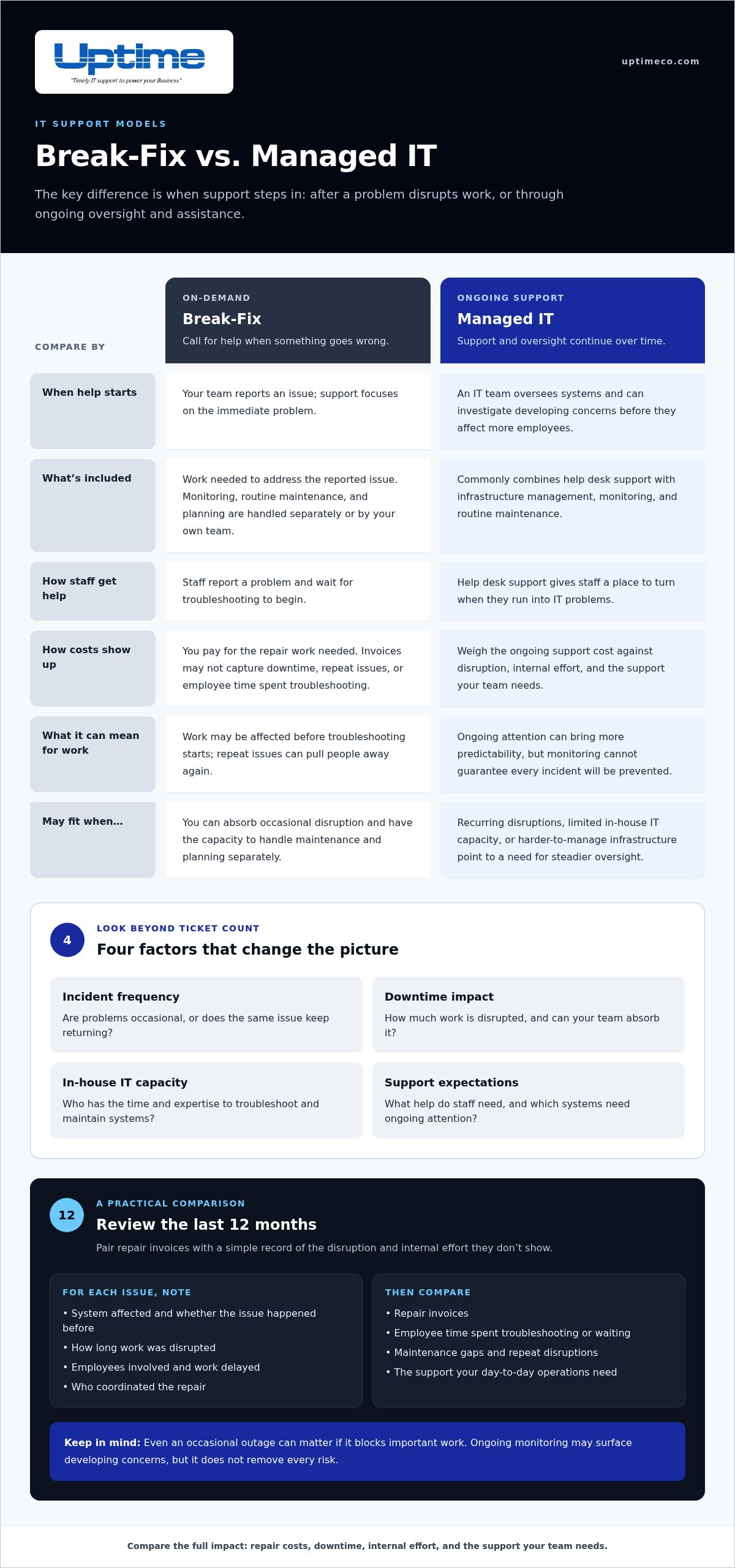
With break-fix support, you call for help when something goes wrong and pay for the work needed to address the issue. It’s a reactive model: support centers on the immediate problem, while monitoring, routine maintenance, and planning are handled separately or by your own team.
Managed IT services provide ongoing support, commonly pairing help desk assistance with infrastructure management, monitoring, and routine maintenance. The Managed services model shifts attention from fixing problems after they disrupt work to overseeing systems over time. Compare the actual scope of support, including what systems are monitored, how staff get help, and which maintenance tasks are covered.
What changes when IT support shifts from reactive to proactive?
Picture an office network slowing down as more staff connect. With break-fix, your team might report the slowdown after work is affected, then wait for troubleshooting to begin. With ongoing monitoring, an IT team can look for signs of a developing network issue and investigate before it interrupts more employees. Monitoring helps surface potential trouble, but it can’t guarantee every incident will be prevented.
That difference matters even if problems are rare. Ask how costly an outage would be, who handles routine updates and troubleshooting now, and whether your staff has the time and expertise to maintain systems. A small team with no in-house IT capacity may need a different level of oversight than a business with experienced IT staff.
To make the break-fix vs managed it services comparison practical, look beyond how often issues occur. For each incident, record the system affected, how long work was disrupted, which employees were involved, and who coordinated the repair. Note whether the same issue has happened before. That record gives you a clearer view of the support your day-to-day operations need.
How to Choose Between Break-Fix and Managed IT Services
Don’t decide by counting tickets alone. An occasional problem can still cause serious disruption if it blocks sales, payroll, or customer service. Consider how often issues occur, how much downtime your team can absorb, who has the expertise to troubleshoot, and what kind of support staff need. A quiet year doesn’t automatically mean break-fix is the right fit. One high-impact outage can make ongoing oversight worth considering.
For a useful comparison, review the pattern and the fallout. Keep a simple log of each issue, the team affected, time spent resolving it, and any work delayed. Then compare repair invoices with the time employees spent troubleshooting or waiting for systems to return. This gives you a stronger basis for weighing reactive support against an ongoing model. If you’re assessing what ongoing support can cover, this overview of what an MSP is offers helpful context.
Which business signals point toward ongoing managed support?
Recurring disruptions, limited in-house IT capacity, or infrastructure that’s getting harder to manage can all point toward a need for steady oversight. Security and continuity needs matter, too. Ongoing attention to systems, backups, and security can support more consistent operations, but it can’t eliminate every risk. Note the recurring issue, affected team, and operational consequence. Those details help reveal whether the same problems keep pulling people away from their work.
For Orange County organizations weighing the next step, Uptime Co.’s managed IT services include 24/7 network monitoring, help desk support, and infrastructure management. Use your issue log to identify the systems and recurring problems you want ongoing support to address.
What Managed IT Services Look Like with Uptime Co.
Managed IT with Uptime Co. brings ongoing network oversight and hands-on support together. The service includes 24/7 network monitoring, help desk support, and infrastructure management, along with routine maintenance and immediate technical assistance. Monitoring can help surface developing concerns, while help desk support gives staff a place to turn when they run into IT problems.
Your technology needs may reach beyond the network. Uptime Co. also provides cybersecurity, cloud, and backup services, which can help address protection, hosted systems, and data recovery as part of your broader technology plan. The Benefits of Managed Services include a more proactive approach to oversight, though ongoing support can’t eliminate every risk. The right mix depends on your systems, priorities, and internal capacity.
How can an Orange County business take the next step?
Before you talk through the break-fix vs managed it services decision, jot down a few essentials:
- The key systems your team relies on
- Recurring incidents and the people or work they affect
- Who currently handles support, maintenance, and security tasks
This snapshot makes it easier to identify what’s working and where your team needs more support. For a closer look at the approach, read Uptime Co.’s managed IT services guide. You can also talk with Uptime Co. about your IT support needs. Start with your systems and recurring challenges, then focus the discussion on the level of support that fits your Orange County business.
Choose IT Support That Keeps Your Team Moving
The right choice in the break-fix vs managed it services decision depends on more than how often something goes wrong. Weigh the impact of downtime, your team’s capacity to handle routine IT work, and the level of support your business needs. Even a few incidents can warrant a closer look if they disrupt important work or leave staff without in-house help.
Uptime Co. has supported organizations with IT network administration and technology consulting since 1994. Its managed IT services include 24/7 network monitoring, help desk support, and infrastructure management, bringing ongoing oversight and user assistance together.
Ready to compare your current support approach with ongoing managed IT? Talk with Uptime Co. about managed IT support for your Orange County business. Bring your list of key systems, recurring issues, and downtime impacts to start a practical conversation about your needs.
Frequently Asked Questions
Is break-fix IT support cheaper than managed IT services?
Not necessarily. In the break-fix vs managed it services comparison, total value depends on how often incidents happen, how much disruption they cause, and what support each arrangement covers. If issues are rare and low-impact, reactive help may fit. Review your support records alongside the time staff lose to outages, then compare the full picture rather than invoices alone.
Can a small business use break-fix IT support?
Yes, a small business can use break-fix support, especially if it has occasional, manageable issues and can arrange help when something breaks. But low incident frequency isn’t the whole test. Consider whether anyone in-house can handle routine maintenance and troubleshooting, and what a disruption would mean for customers, revenue, or deadlines. Those factors matter for an Orange County business as much as company size.
What is included in managed IT services?
Managed IT services typically combine ongoing network monitoring, help desk support, and infrastructure management. Together, these provide system oversight, assistance with staff issues, and routine management of the technology environment. Uptime Co.’s managed IT services include 24/7 network monitoring, help desk support, infrastructure management, routine maintenance, and immediate technical assistance. Uptime Co. also provides cybersecurity, cloud, and backup services to address broader technology needs.
When should a business switch from break-fix to managed IT services?
Reassess your support model when incidents keep recurring, outages interrupt work, your team lacks time or expertise for routine IT tasks, or your technology environment becomes more complex. Track each issue, the staff affected, and the operational impact. If your notes show that reactive fixes leave important gaps, managed IT services may provide a better-aligned level of ongoing oversight for your Orange County business.


