

What if your security tools are working, but nobody is connecting the alerts, gaps, and next steps? A computer security service should do more than install protection. It should help you understand what is happening and decide what to do next. If you are unsure which safeguards matter or do not have time to monitor risks yourself, start by mapping the systems your business depends on.
The right service brings protection and oversight together, rather than leaving your team to manage a patchwork of tools. This guide explains how to compare core safeguards, ongoing monitoring, reporting, and support against your business risks and in-house capacity. You will also find practical ways to strengthen everyday security, from keeping software updated to helping staff spot suspicious messages. By the end, you will have a focused checklist for evaluating security services, including options for businesses in Orange County.
Key Takeaways
- A computer security service should combine protection with ongoing oversight, not leave you managing disconnected tools.
- Start by identifying critical systems, spotting gaps, and deciding how much support your team needs.
- Compare more than firewalls: review endpoint and email protection, threat detection, vulnerability remediation, and employee training.
- Uptime Co. combines 24/7 SOC monitoring with transparent reporting and vCIO guidance to connect security decisions with business goals.
What Should a Computer Security Service Protect in Your Business?
A computer security service should cover more than individual devices. It brings protection, oversight, and support together across the systems your business relies on, including employee computers, email, networks, cloud services, and backups. In enterprise environments where secure data transmission requires advanced safeguards like keyless stealth tunneling, specialized providers such as quantuminfinity.ch offer focused network protections. The goal is to reduce security gaps and give your team a clear process for handling issues.
Each safeguard covers a different layer. Firewalls help manage network traffic. Endpoint protection focuses on devices such as laptops and workstations. Email security helps address threats arriving through messages, while threat detection looks for suspicious activity that may need investigation. For a broad introduction to the field, see What is computer security?
These protections work best as part of a managed process. Tools need monitoring and maintenance, and your business needs to know who reviews alerts, addresses vulnerabilities, and communicates next steps. A dashboard full of warnings is of little use if nobody has time or responsibility to act on them.
How is a managed security service different from security software?
Security software provides features. A managed service adds people and processes to oversee those protections, review alerts, address vulnerabilities, and support a response when an issue appears. One does not replace the other: software is part of the defense, while ongoing oversight helps keep it useful and aligned with your business.
For example, an employee might receive a convincing email and open an attachment. Email security may help filter suspicious messages, and endpoint protection may help identify activity on the device. No single tool prevents every incident. Monitoring can surface a warning, while a defined response process gives your team a practical next step. In cases where an alert escalates into a confirmed security event, organizations often rely on specialized cyber breach response and review providers like Trustpoint.One to handle investigation and containment.
To see where your business may have gaps, list the systems staff use for daily work. For each one, note which safeguard protects it, who maintains that safeguard, and who reviews its alerts. This quick inventory can show where protection exists, where oversight is missing, and what support your team needs.
How to Compare Computer Security Services for Your Business
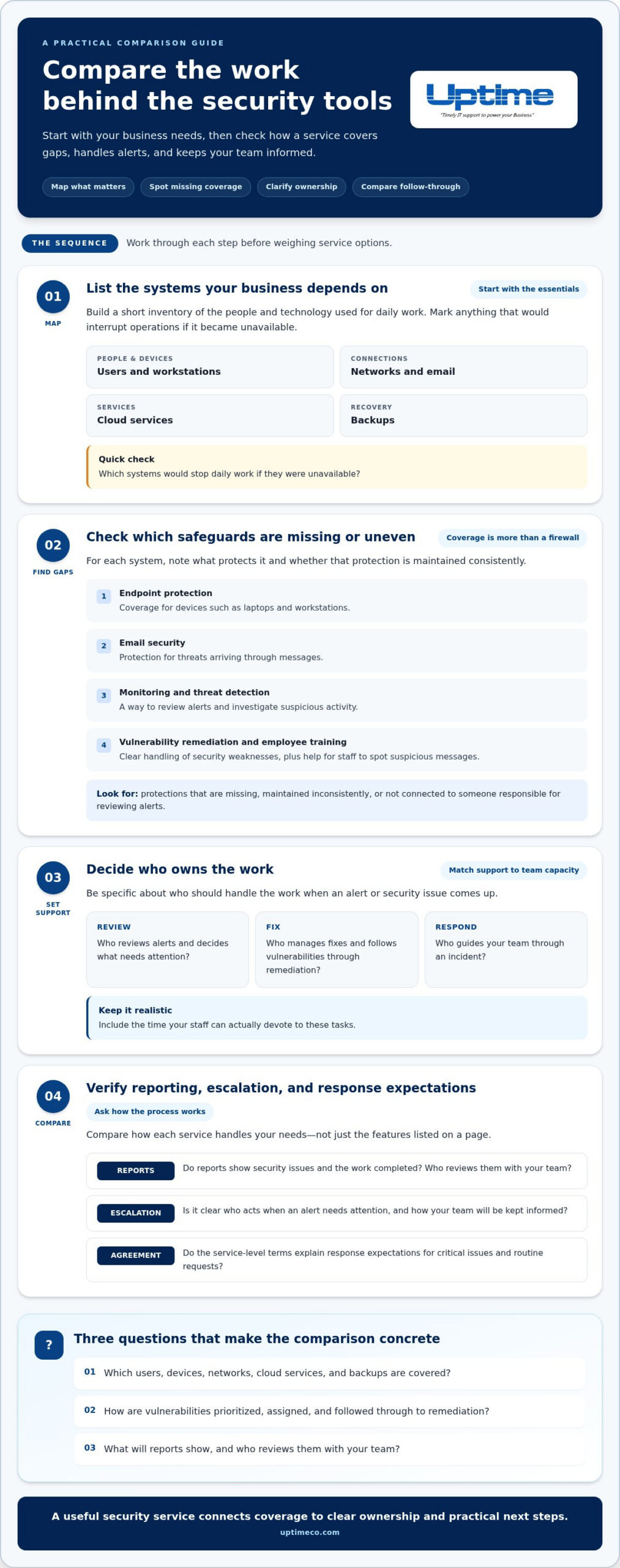
Compare the work behind the tools, not just a feature list. A computer security service should fit your systems, address practical gaps, and give your team a clear path when an alert needs attention. Start with a short inventory:
- Map critical systems. List the users, workstations, networks, cloud services, and backups your business depends on. Mark which systems would interrupt daily work if they became unavailable.
- Find coverage gaps. Note where monitoring, endpoint and email protection, vulnerability remediation, or employee training is missing or handled inconsistently.
- Define support needs. Decide who should review alerts, manage fixes, and guide your team through an incident. Include the time your staff can realistically devote to these tasks.
Then compare how each service handles those needs. Look for reports that show security issues and work completed, plus an escalation process that explains who acts and how your team is kept informed. Service-level agreements set response expectations, so read the terms and understand how critical issues and routine requests are handled. For practical security guidance alongside your review, explore resources from the Cybersecurity and Infrastructure Security Agency (CISA).
Which questions reveal whether the service fits your team?
Use these prompts to make the comparison concrete:
- Which users, devices, networks, cloud services, and backups are covered?
- How are vulnerabilities prioritized, assigned, and followed through to remediation?
- What will reports show, and who reviews them with your team?
Clear answers help connect security work to business priorities instead of generating alerts without context. Uptime Co. provides business cybersecurity support, including firewalls, endpoint protection, email security, threat detection, vulnerability remediation, and security awareness training. Explore Uptime Co.’s business cybersecurity support.
What Uptime Co.’s Computer Security Service Looks Like in Practice
Uptime Co. brings several layers of business protection together: firewalls, endpoint and email security, threat detection, vulnerability remediation, and employee security awareness training. Its 24/7 SOC monitoring provides ongoing oversight, while transparent reporting helps you understand system health, security activity, and service performance. That makes it easier to see what needs attention, not just which tools are installed.
Security decisions also need to fit the way your business operates. Uptime Co.’s vCIO team aligns technology planning with business goals and builds a technology roadmap around your priorities. The NIST Cybersecurity Framework can also help you organize security priorities and discuss them with your team.
Uptime Co. serves businesses in Orange County, including Irvine, Tustin, Orange, and Anaheim. A coordinated approach connects security with day-to-day IT support and business continuity, so findings can inform broader technology planning.
How does security fit into managed IT and business continuity?
Coordinated managed IT services can connect security findings with maintenance and broader technology planning. Backup and disaster recovery planning helps your team prepare for disruption. When reviewing these areas, consider which systems are essential, who is responsible for maintaining them, and how your team would continue work if access were interrupted.
Bring your current systems, security concerns, and business priorities into the conversation. Talk with Uptime Co. about your security needs and start shaping a practical plan for your team.
Turn your security priorities into a clear next step
Before choosing a computer security service, name one business outcome your technology needs to support, such as protecting access to essential files or keeping customer work moving. Bring a short list of critical systems, recurring concerns, and the time your team can devote to security. This shifts the conversation from comparing features to deciding what your staff can maintain. Start with the most important gap rather than trying to solve everything at once, and identify who should help set priorities and keep the plan connected to daily operations.
Uptime Co. brings over 30 years of IT experience and dedicated U.S.-based support to business technology planning. Start with the pressure points affecting your people and operations, then build from there. Talk with Uptime Co. about protecting your business systems and take a practical next step toward security that fits the way you work.
Frequently Asked Questions
Is a computer security service the same as antivirus software?
No. Antivirus software focuses on detecting or blocking malicious files, while a service can address wider business security needs. For a practical check, review your device list and confirm protection covers every company laptop and workstation, including devices used away from the office. Also identify who keeps that protection current as your team and equipment change.
Can a small business benefit from managed computer security?
Yes, especially if your team does not have time or dedicated expertise to manage security tasks alongside daily work. A managed service can provide ongoing support without making one employee responsible for every tool and alert. Note which security tasks are regularly delayed. That gives you a practical way to identify where support could help.
How does 24/7 security monitoring work?
A security operations center (SOC) monitors security alerts around the clock. An alert does not automatically mean an incident has occurred; it signals activity that may need review. The service-level agreement should explain how alerts are assessed, when they are escalated, and how your team is informed. Ask how that process connects with your incident contacts and responsibilities.
What should I prepare before discussing computer security services?
Bring a short list of security concerns, recent disruptions, and technology tasks that are hard to keep up with. Note who currently receives alerts and what your team does when something seems suspicious. If available, gather documentation about existing tools and support arrangements. These details help make the discussion specific to your business, rather than a general review of features.


