

A backup alone won’t get your business back on track. Effective disaster recovery solutions in Brea pair protected copies of critical data with a clear plan to restore systems, serve customers, and resume essential work. Start by identifying what must come back first and who will lead the response.
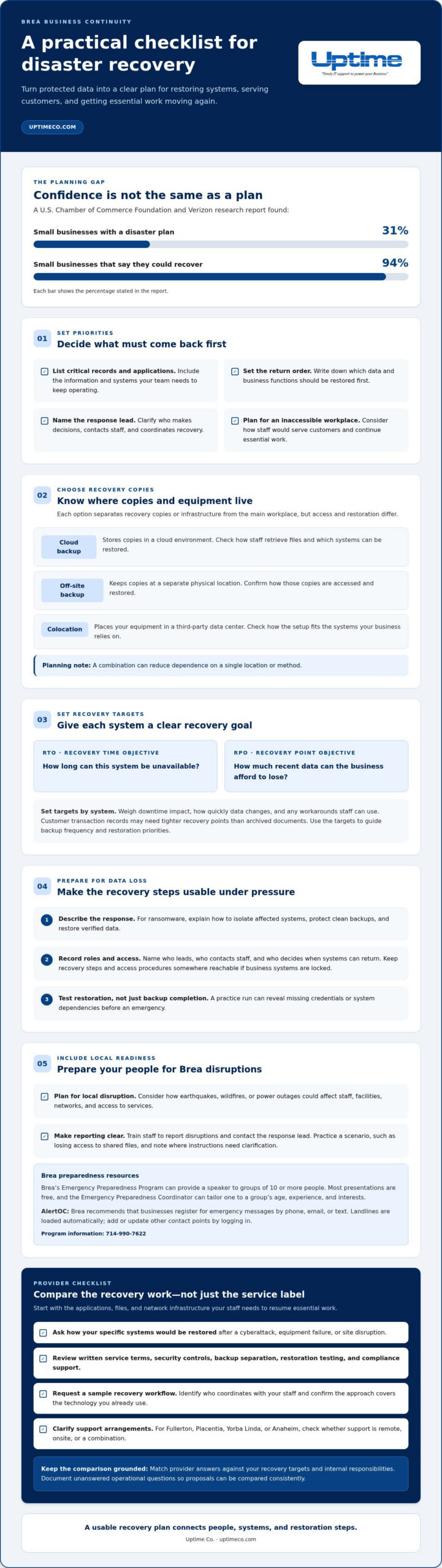
It’s easy to assume you’ll figure out recovery when the time comes. A U.S. Chamber of Commerce Foundation and Verizon research report found that 31% of small businesses have a disaster plan, while 94% say they could recover from a disaster. A plan turns that confidence into practical next steps. Learn how to prioritize operations, protect important information, and prepare your team to recover. We’ll break down the core parts of a workable plan and explain when expert IT support can help.
Key Takeaways
- Map which data and business functions need to return first, then build recovery priorities around what keeps work moving.
- Use Brea’s local preparedness resources to strengthen your response plan and keep staff informed during an emergency.
- Compare recovery providers by how their backup, cybersecurity, cloud, and network support fit your business operations.
- Connect IT management with recovery planning so your team knows how systems and essential work can resume after disruption.
Disaster preparedness and recovery for small businesses
Build disaster recovery solutions in Brea around the systems and information your business needs to keep operating. A U.S. Chamber of Commerce Foundation and Verizon research report found that 31% of small businesses have a disaster plan, while 94% say they could recover from a disaster. List critical records, essential applications, decision-makers, and the order each should return. Consider how staff would serve customers if the workplace were inaccessible.
Include schools and other community infrastructure in local planning. An earthquake, wildfire, or power outage can disrupt facilities, networks, and access to services. Identify which systems your team needs to continue essential work, then train staff to report disruptions and contact the response lead. Practice a scenario, such as losing access to shared files, and note where the plan needs clarification. These steps make disaster recovery solutions in Brea more practical for the people who will use them.
Brea’s Emergency Preparedness Program can provide a speaker to groups of 10 or more people. Most presentations are free, and the Emergency Preparedness Coordinator can tailor one to a group’s age, experience, and interests. Brea recommends that businesses register with Orange County’s AlertOC for emergency messages by phone, email, or text. Landlines are loaded automatically; add or update other contact points by logging in. For program information, call 714-990-7622.
Compare providers using written recovery targets, service terms, restoration testing, security controls, and compliance documentation. Applicable California or federal requirements depend on your industry, data, and contracts, so map those obligations to backup access, retention, and recovery procedures. Plan for local disruptions such as earthquakes, wildfires, and power outages, and consider how each could affect staff, facilities, and network infrastructure.
Disaster recovery
Disaster recovery turns protected data into a workable return to service. Prioritize storage and restoration around the systems your Brea team needs most.
Cloud, Off-Site, and Colocation Options
Cloud backup stores copies in a cloud environment, off-site backup keeps copies at a separate physical location, and colocation places your equipment in a third-party data center. Each separates recovery copies or infrastructure from your main workplace, but access and restoration differ. Compare how staff can retrieve files, which systems they can restore, and how each option fits your operations. A combination can reduce dependence on a single location or method.
Recovery Time and Point Objectives
A recovery time objective (RTO) is how long a business can tolerate a system being unavailable; a recovery point objective (RPO) is how much recent data it can afford to lose. Set each target by system, based on operational needs. For example, customer transaction records may need tighter recovery points than archived documents. Weigh the impact of downtime, how quickly data changes, and the workarounds staff can use. These targets help determine backup frequency and restoration priorities.
Plans for Ransomware and Data Loss
A ransomware recovery plan explains how to isolate affected systems, protect clean backups, and restore verified data. Identify who leads the response, who contacts staff, and who decides when systems can return. Keep a current inventory of critical applications, recovery steps, and access procedures somewhere reachable if business systems are locked. Test restoration, not just backup completion. A practice run can reveal missing credentials or dependencies before an emergency.
Government agencies and community organizations may coordinate relief, grants, and funding for residents impacted by wildfires. Those recovery efforts can help individuals, but they don’t restore business systems. Keep public assistance separate from technical recovery planning, and focus mitigation on the infrastructure your team controls. A focused review of your recovery architecture can help expose gaps.
Which disaster recovery providers serve businesses in Brea and nearby Orange County cities?
For a Brea business, options include managed IT providers, cloud backup companies, and colocation operators. These provider types address different recovery needs. A cloud backup company focuses on stored data copies. A colocation operator houses business equipment in a separate facility. A managed IT provider can connect recovery planning with the systems your team uses. Choose based on the recovery tasks you need covered, not a broad service label.
Start with a short scope list. Name the applications, files, and network infrastructure your staff needs to resume essential work. Then ask each provider to explain how those specific systems would be restored after a cyberattack, equipment failure, or site disruption. For example, if your team relies on a customer database and shared files, ask how each would be recovered and who handles the steps. Match the answers against your recovery targets and internal responsibilities.
Compare written service terms, security controls, backup separation, restoration testing, and compliance support. Request a sample recovery workflow and identify who coordinates with your staff during restoration. Confirm that the approach covers the technology you already use, rather than assuming every platform is included. For businesses in Fullerton, Placentia, Yorba Linda, or Anaheim, clarify whether support is remote, onsite, or a combination. Focus the comparison on response roles, backup access, and practical recovery steps.
Before choosing, document unanswered operational questions and use them to compare proposals consistently. A clear scope helps reveal whether you need backup management, broader recovery coordination, or both. To discuss a recovery plan for your business, start a disaster recovery conversation.
Uptime Co.: Managed IT Services
Uptime Co. can help your Brea business connect recovery planning with the IT systems your team relies on through Managed IT Services. Consider this support when coordinating backups, security, cloud systems, and network infrastructure feels difficult to manage internally.
Cybersecurity Solutions can support planning for cyber threats, while Cloud Services and Network Infrastructure address key parts of your technology environment. Bring a clear list of critical systems, recovery priorities, and current concerns to the conversation. This gives you a practical starting point for seeing how these services fit your operations.
Contact Uptime Co. to discuss your business’s IT needs and identify a practical next step.
Make Your Recovery Plan a Working Tool
Build recovery into regular business planning, not just emergency response. Assign someone to keep system priorities current, and revisit them whenever your operations change. A new application, staff workflow, or customer process can shift what needs to come back first. This habit keeps your plan aligned with the way your business works.
For disaster recovery solutions in Brea, Uptime Co. can connect your recovery needs with Managed IT Services, Cybersecurity Solutions, and Cloud Services. Bring your priority systems and open questions to the conversation, then map out a practical next step for your organization.
Contact Uptime Co. about disaster recovery and keep building a plan your team can use with confidence.
Frequently Asked Questions
What disaster recovery services do IT providers in Brea, CA offer?
IT providers in Brea may offer backup and recovery, managed IT, cybersecurity, and cloud services. The right mix depends on your systems and who manages them. For example, if your point-of-sale platform relies on a separate payment processor, document that dependency and include the processor in recovery coordination. Uptime Co. offers Backup & Disaster Recovery alongside related business IT services.
What are the steps to create and test a disaster recovery plan for a small business?
Start by naming a recovery lead, listing critical systems, and assigning backup owners. Record how staff can reach key vendors if business email is unavailable. Then test a realistic scenario, such as compromised account credentials: practice reporting it, limiting access, and confirming how essential work can continue. Afterward, note gaps, assign fixes, and update the plan when systems or responsibilities change.
What recovery time objective (RTO) and recovery point objective (RPO) should a Brea business target?
Set RTO and RPO targets separately for each system, based on tolerable downtime, how much recent data you can afford to lose, how quickly data changes, and available workarounds. Customer transaction records may need tighter recovery points than archived documents.


