

A headline uptime percentage can hide very different realities. Uptime measures how often a system is available during an agreed period, and the target only makes sense when you know what counts as downtime and how it’s measured. Infrastructure uptime services monitor systems and track availability, while uptime itself is calculated by subtracting downtime from total time, dividing by total time, and multiplying by 100.
You already know that outages interrupt work. The challenge is understanding what an uptime figure means for a website, network, or service-level agreement. This guide explains how monitoring helps identify problems, what commonly causes downtime, and how to interpret uptime targets so you can decide what reliability your organization needs.
Key Takeaways
- Match each monitoring method to the question you need answered, from service availability to application performance and underlying infrastructure health.
- Separate planned maintenance from unexpected failures so uptime reports reflect what happened and why.
- Read an uptime target alongside its measurement period, downtime rules, and exclusions before comparing service-level agreements.
- Use managed IT services to connect monitoring insights with network and cloud reliability needs.
Why Is Website Uptime Monitoring Important?
Monitoring detects outages, tracks availability, and flags declining performance before a critical service fails. A 99.9% target means little without knowing what’s measured and when downtime counts.
Monitoring Across Hosting Environments
Monitoring across hosting environments tracks cloud, colocation, and on-premises systems, helping your organization spot risks wherever its services run. AWS, Google Cloud Platform (GCP), and Microsoft Azure provide platform metrics that teams can combine with service checks. Colocation monitoring also covers facility power and environmental conditions, such as temperature, alongside equipment status. Compare coverage across environments so a gap between cloud and on-site systems does not conceal a failure.
Monitoring Servers, Networks, Platforms, and Applications
Infrastructure monitoring measures the health of underlying components, including CPU, memory, storage, network latency, and power. Server and network checks show whether resources are available and functioning. Uptime monitoring tests whether a service responds; synthetic monitoring simulates user actions, such as loading a page or completing a transaction. Application performance monitoring (APM) examines software behavior, errors, and response times. Together, these views help distinguish a server issue from a slow application or a failed user journey.
To compare providers, assess monitored systems, alerting, historical reporting, and how each service handles dependencies. U.S. compliance needs depend on your organization’s data and obligations: HIPAA, PCI DSS, and CJIS are relevant frameworks for some environments. Availability monitoring can support continuity planning, but uptime alone doesn’t establish compliance.
Services can range from monitoring and alerts to performance reporting and incident-response support. To implement monitoring, map critical services, choose metrics and thresholds, then test alerts against realistic scenarios. Outsourcing can provide monitoring expertise, but clarify who owns alerts, how historical data is accessed, and who handles escalation to avoid blind spots.
What Causes Downtime?
Hardware failure, software bugs, network outages, and maintenance can interrupt operations. Separating planned work from unexpected incidents helps you interpret availability reports and focus prevention efforts where they matter.
Planned and Unplanned Downtime
Planned downtime is scheduled work, such as applying a software patch; unplanned downtime is an unexpected service interruption. The distinction matters because maintenance can be communicated and managed, while a sudden network failure disrupts operations without warning. Record the two separately, and review the service-level agreement’s measurement rules before assessing an uptime report. This gives your organization a clearer picture of operational reliability.
System Performance and Prevention
Performance monitoring tracks signals such as CPU load, errors, and latency to detect conditions that could lead to an outage. A brief CPU spike may pass without impact, while sustained resource pressure can indicate a failing service. Review trends alongside incident records, then address recurring bottlenecks through capacity planning, software maintenance, or redundancy. These steps help reduce avoidable downtime.
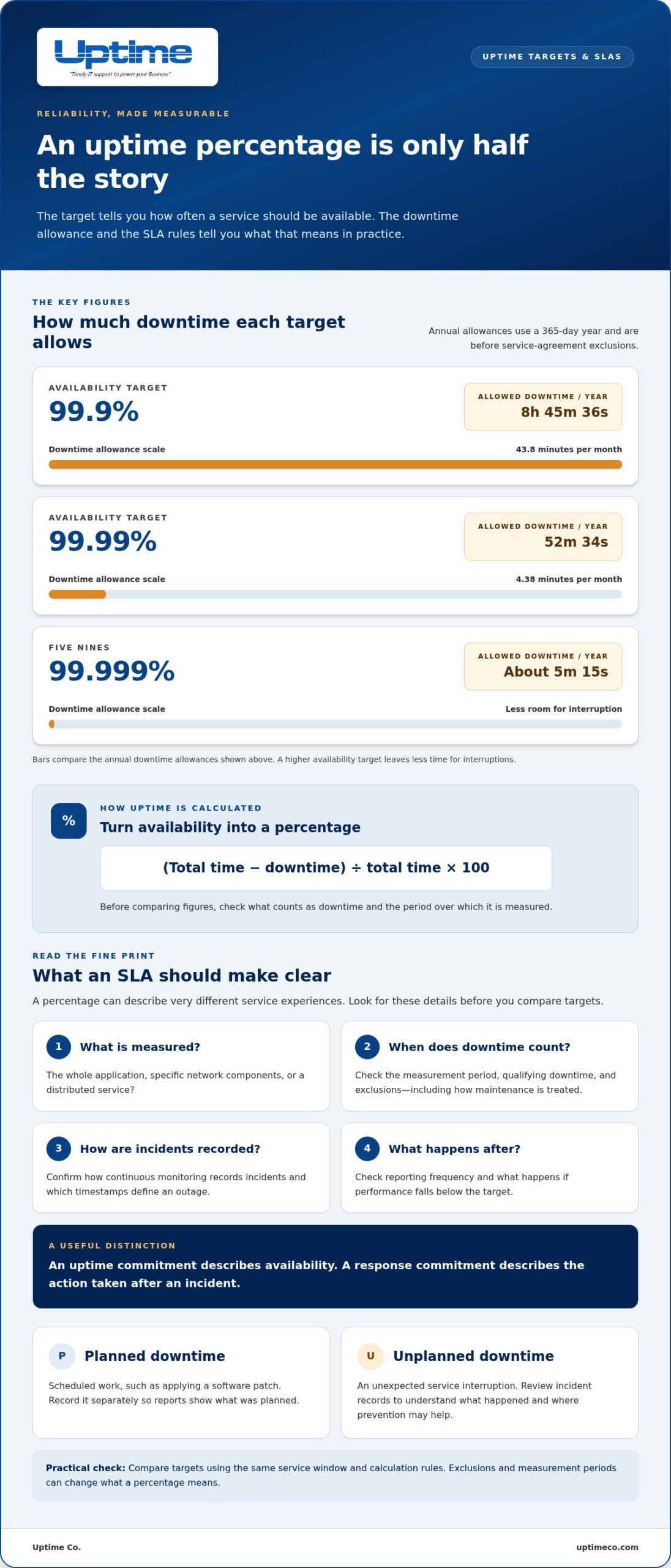
Uptime targets translate downtime into time you can plan around. At 99.9% uptime, a service allows 43.8 minutes of monthly downtime; at 99.99%, it allows 4.38 minutes per month. Compare figures using the same service window and calculation rules, because exclusions and measurement periods affect what the percentage means.
Downtime can also have operational and financial consequences. To improve uptime, use monitoring to spot rising latency, test failover mechanisms, and review incidents to identify their root causes. When evaluating service providers, look for clear reporting on planned maintenance, unplanned outages, and restoration work.
Service-level agreements and uptime targets
A service-level agreement (SLA) turns reliability expectations into measurable commitments. It should define availability, the measurement period, qualifying downtime, exclusions, reporting, and what happens if performance falls below the target. Without those details, the same percentage can describe very different service experiences.
Compare targets by translating them into permitted downtime. At 99.9% availability, the allowance is 8 hours, 45 minutes, and 36 seconds per 365-day year. At 99.99%, it is 52 minutes and 34 seconds. Five nines, or 99.999%, allows approximately 5 minutes and 15 seconds over that year, before service-agreement exclusions. Higher targets leave less room for interruption, so check whether maintenance and other events count.
Then examine what the SLA measures. A target might cover an entire application, specific network components, or a distributed service. Confirm how continuous monitoring records incidents, which timestamps define the outage, and how often the provider issues a report. Also distinguish an uptime commitment from a response commitment: one describes availability, while the other addresses action after an incident.
For healthcare organizations, the Centers for Medicare & Medicaid Services says business owners must coordinate with infrastructure providers so telecommunications SLAs meet required recovery objectives. Compare your recovery priorities with uptime metrics, then check that reporting and response terms support them. An SLA is useful when its measures connect directly to the applications and operations you depend on.
Build an uptime plan around your reliability targets and the systems your organization depends on.
Uptime: Managed IT Services
Uptime Co. can help when outages repeatedly disrupt daily work or your team needs a clearer plan for system reliability. Its Managed IT Services support organizations that need help managing their technology environment, while Network Infrastructure and Cloud Services address the systems those operations depend on.
Use your SLA targets as a starting point. Identify the applications and network components that matter most, then connect those priorities to monitoring, maintenance, and recovery planning. Cybersecurity Solutions can support a broader approach to protecting business systems. The right mix depends on your infrastructure and operational needs.
If your team spends too much time responding to recurring incidents, or you are planning a cloud or network change, Uptime Co. can help you consider the next steps. Contact Uptime Co. to discuss your infrastructure needs.
Make reliability a working priority
Turn your uptime target into a practical operating plan. Decide which systems need the strongest continuity, who owns each response, and how you will review recurring issues. Clear ownership makes reliability part of everyday operations, not just a number in an agreement.
When you need help connecting those priorities to your technology environment, Uptime offers Managed IT Services, Cybersecurity Solutions, and Cloud Services. The right infrastructure uptime services approach starts with your organization’s needs and the systems it depends on.
Start a conversation about your uptime priorities and map out a clear next step. Build from what matters most, then keep moving forward.
Frequently Asked Questions
What does uptime mean in different contexts?
The right measure depends on a service’s purpose and operating schedule. For a payroll system, access during payroll processing may matter most, while a public information portal may need to remain usable outside business hours. Write down the user task and the hours it must work before comparing uptime figures. This makes the measure relevant to your actual operations.
What Are Uptime Solutions?
Uptime solutions can combine design choices and operational practices to limit disruption. For example, an organization might maintain a backup connection for a critical office or document a recovery sequence for a business application. Consider which function would stop work first during an outage, then prioritize safeguards for it. The right mix depends on system dependencies and business priorities.
What Is Availability?
Availability means a service can perform its intended function when someone needs it. A payroll application may open successfully but still be unavailable for its purpose if employees cannot submit time records. Define the essential task first, then assess whether users can complete it. This user-focused view can reveal problems that a simple “online” status misses.
What is infrastructure monitoring and why does it matter?
Infrastructure monitoring gives teams information about the condition of technology assets that support business operations. A practical starting point is an inventory connecting each key asset to its business owner and dependent services. Keep that map current after changes, such as moving an application to a new cloud environment. Clear ownership helps teams understand which systems a change could affect.
What are infrastructure uptime services?
Infrastructure uptime services help organizations plan dependable technology operations by aligning system responsibilities, business priorities, and recovery expectations. For example, a company adding a cloud application can define who manages its network connection and who handles application access. In Orange County, Uptime Co.’s Managed IT Services can support organizations coordinating their IT environment around these operational needs.


