

What if your next network upgrade could support growth without throwing your team’s workday off course? Network design and implementation doesn’t have to be a maze of technical terms. Start with what your business needs, then turn those needs into a practical plan.
It’s reasonable to want clear steps, minimal disruption, and a network that can adapt as your business grows. Plan around your people, applications, security needs, and future demands before deployment begins. For businesses in Orange County, that means accounting for how employees work across the office, connect to cloud applications, and access shared systems.
In this guide, you’ll learn how a project moves from requirements and design to deployment and ongoing support. You’ll also find practical ways to plan for reliability, security, and growth, and see how Uptime Co.’s assessment and planning connect network decisions to business goals. Use the steps to make informed choices and keep your network ready for what’s next.
Key Takeaways
- Separate the network blueprint from deployment, and understand how physical, logical, and virtual choices shape business connectivity.
- Make network design and implementation easier to manage by inventorying critical systems, users, locations, and connectivity needs before planning.
- Use a clear sequence: assess, document, design, deploy, test, and hand off, with practical preparation to reduce surprises.
- Plan documentation, ownership, monitoring, and maintenance before project close so the network stays supported as security needs and capacity change.
What Network Design and Implementation Means for Your Business
Network design is the plan for how your business’s devices, systems, and users connect and communicate. Implementation is the hands-on work of putting that plan in place, configuring equipment, and checking that connections work as intended. Together, network design and implementation turn business requirements into the foundation for daily operations.
The plan has three layers. Physical choices include cabling, switches, and wireless access points. Logical choices determine how traffic moves and which users can reach particular systems. Virtual choices use software to create networks or segments that organize access without relying only on separate physical equipment. These decisions are part of computer network engineering, but the goal is practical: connect the right people and tools reliably and securely.
How network design choices shape everyday business operations
Picture a small office. Employees use laptops and phones to reach business applications, share files, print documents, and join video calls. The network needs to provide suitable connections, direct traffic, and control access to shared resources. If a key connection is overloaded or permissions are poorly organized, routine work can slow down or users may be unable to reach the tools they need.
Start with how people actually work. A healthcare organization may need dependable access to clinical systems; a finance team may prioritize protecting sensitive information; a retailer may rely on connected checkout and inventory tools. An education setting may need consistent access across classrooms, while a construction business may need to connect office staff with teams across sites. Each situation points to different capacity, access, and coverage requirements.
Good design balances current workflows with reliability, security, and room to grow. List the applications employees rely on, identify who needs access, and note where connectivity matters most. That gives assessment and planning a clear business target instead of letting technical choices drive the project.
How to Plan and Implement a Business Network Step by Step
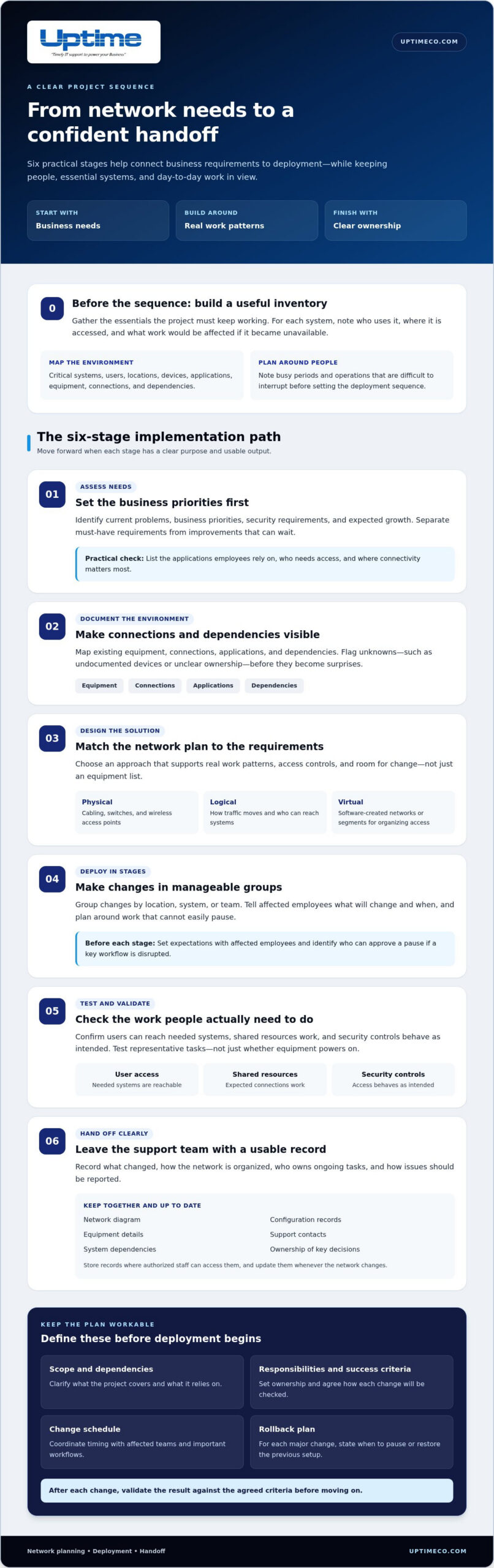
A clear sequence keeps a network project grounded in business needs and helps limit disruption. Begin with an inventory of critical systems, users, locations, devices, and the connections each depends on. Note busy periods and operations that are difficult to interrupt. For each system, record who uses it, where it is accessed, and what work would be affected if it became unavailable. This gives the project team a useful picture of what must keep working.
- Assess needs. Identify current problems, business priorities, security requirements, and expected growth. Separate must-have requirements from improvements that can wait.
- Document the environment. Map existing equipment, connections, applications, and dependencies. Flag unknowns, such as undocumented devices or unclear ownership, before they become surprises.
- Design the solution. Match the network approach to the requirements, including access controls and room for change. Check that the plan supports real work patterns, not just an equipment list.
- Deploy in stages. Group changes by location, system, or team. Tell affected employees what will change and when, and plan the sequence around work that cannot easily pause.
- Test and validate. Check that users can reach the systems they need, shared resources work, and security controls behave as intended. Test representative tasks, not just whether equipment powers on.
- Hand off clearly. Record what changed, how the network is organized, who owns ongoing tasks, and how issues should be reported.
What should a network implementation plan include?
Make the plan useful to both technical staff and business stakeholders. Define the project scope, dependencies, responsibilities, success criteria, and change schedule. Include a rollback plan for each major change, with clear conditions for pausing or restoring the previous setup. Uptime’s IT assessment and planning connects network decisions to business priorities, helping teams shape a practical deployment and define security requirements alongside the broader cybersecurity guide.
Before each stage, tell affected employees what to expect and identify who can approve a pause if a key workflow is disrupted. After the change, validate the result against the agreed criteria before moving on. This makes network design and implementation easier to coordinate and gives the team a consistent way to catch issues. Uptime’s IT consulting and planning helps connect network decisions to business goals.
Keep the Network Secure, Supported, and Ready to Grow
A network isn’t finished when the new equipment is online. It needs clear ownership and a plan for monitoring, maintenance, and future changes. Before project close, decide who handles routine reviews, how issues are reported, and where current network records are kept. Without those basics, a well-planned network can become harder to support as people, systems, and priorities change.
From project handoff to ongoing network management
Make the handoff useful to the people who will support the network. Keep an up-to-date network diagram, configuration records, equipment details, and support contacts together. Note which systems depend on each connection and who owns key decisions. Store the records where authorized staff can access them, and update them whenever the network changes.
Monitoring helps turn those records into action. Uptime’s 24/7 Network Operations Center monitoring tracks system health and surfaces performance issues, alerts, and potential risks for review. Monitoring doesn’t replace maintenance. Schedule regular reviews of access, capacity, and network security, and record what changed and why.
Use business changes as prompts for a network review. A new location, a larger team, a shift in application use, or added cloud services can change network demands. Check whether capacity still fits, access remains appropriate, and the design supports how employees work. Uptime’s vCIO team aligns technology planning with business goals and develops technology roadmaps, keeping network decisions connected to what comes next.
For ongoing readiness, connect network oversight with managed IT services and cloud services planning. Clear ownership, consistent monitoring, and current documentation give your team a stronger foundation for protecting operations and adapting with confidence.
Make Your Next Network Decision Count
Your next move can be simple: name the business change you want your network to support, whether that’s a new workflow, a growing team, or a shift in how employees work. Use that priority to guide conversations about timing and capacity instead of treating every possible upgrade as urgent. With over 30 years of IT management and consulting experience, Uptime helps connect network decisions to business goals. Transparent reporting provides visibility into system health and service performance, giving you clearer context for the next decision.
Strong network design and implementation should keep pace with your business, not lock you into yesterday’s assumptions. Start with the change ahead and shape a plan around it. Talk with Uptime about planning a secure, reliable business network for your Orange County organization.
Frequently Asked Questions
What is the difference between network design and network implementation?
Network design defines the intended structure and rules; implementation turns them into a working setup. Think of design as the approved blueprint and implementation as configuring and connecting the components. After deployment, compare the finished setup with the design record. If a connection, access rule, or device differs, document why so future troubleshooting starts with accurate information.
What are the main steps in a network design and implementation project?
A project moves from discovery and design approval into deployment, acceptance testing, and operational handoff. At each stage, confirm the business requirements, approve the proposed approach, verify key workflows after changes, and assign ongoing ownership. This keeps open questions visible and gives the team a record of why important choices were made.
How can a business reduce disruption during network implementation?
Choose a change window that fits the work affected, then confirm the plan with the people who rely on those systems. For an Orange County office, coordinate a change affecting shared files with the team’s busiest work periods. Identify who can approve a pause, and test a typical employee task as soon as the change is complete.
Why should network monitoring be part of the implementation plan?
Monitoring gives the support team a view of network behavior after launch, not just a snapshot from testing. Establish a baseline for normal performance, then review patterns such as recurring slowdowns or alerts tied to a particular connection. That context helps distinguish a one-off issue from a capacity or configuration concern and guides what to investigate next.


