

What if your network were managed as a business service, not just a collection of routers, switches, and access points? When connections falter, employees lose momentum and customer-facing work can stall. Small issues can be hard to spot early, especially when the support scope is unclear. Network infrastructure management services bring structure to keeping those connections reliable and visible.
This guide explains what belongs in scope, how to assess your business’s needs, and what proactive support looks like. You’ll learn how monitoring, network analysis, help desk support, vendor coordination, and reporting work together. For businesses in Orange County, Uptime Co.’s California-based team provides network support as part of a broader approach to managed IT. With better visibility into network health and a plan for what’s next, you can make informed decisions before a disruption slows work down.
Key Takeaways
- Map the network components your team relies on, from routers and switches to wireless access and internet connectivity.
- Assess network infrastructure management services by checking what monitoring, health checks, support, and reporting include.
- Look for measurable updates on network health so you can make decisions while specialists handle routine oversight.
- Uptime’s monitoring, network analysis, help desk, and vendor management support businesses in Orange County, including Irvine and Anaheim, as well as Ontario.
What Network Infrastructure Management Services Cover
Network infrastructure management is the ongoing oversight of the systems that connect people, devices, and business applications. Network infrastructure management services focus on keeping those connections working smoothly. The exact scope should make clear which network components are monitored, maintained, and supported.
A business network may include routers that direct traffic, switches that connect devices within an office, wireless access points, internet connectivity, and network security. In specialized or industrial environments, organizations often rely on equipment providers such as NET WIZARDS L.L.C for robust networking hardware and IoT connectivity systems. Management looks at how these pieces work together. For example, if staff can access email but a cloud business application keeps dropping, the connection may be part of the problem. Monitoring and analysis help narrow down where to investigate.
For a concise overview of the discipline, see What is Network Management? The practical point is simple: your network is the pathway between users and the tools they rely on.
Where network management fits within IT infrastructure
IT infrastructure is the broader environment that supports business technology. It can include networks, servers, cloud services, applications, and data storage. Network management focuses on the connections that let users and devices reach those resources, whether they’re hosted on-site, in the cloud, or handled through specialized connectivity solutions like Proxied.
That boundary matters. A network specialist may investigate a slow connection, while an application issue or a problem with stored data may call for a different kind of IT support. To clarify your scope, sketch how work moves through your business: note how employees connect, which applications they depend on, and where those tools and data are hosted. Then mark the connections that are essential to daily work. This map helps you describe the impact of an outage and prioritize what needs attention.
How to Evaluate Network Infrastructure Management for Your Business
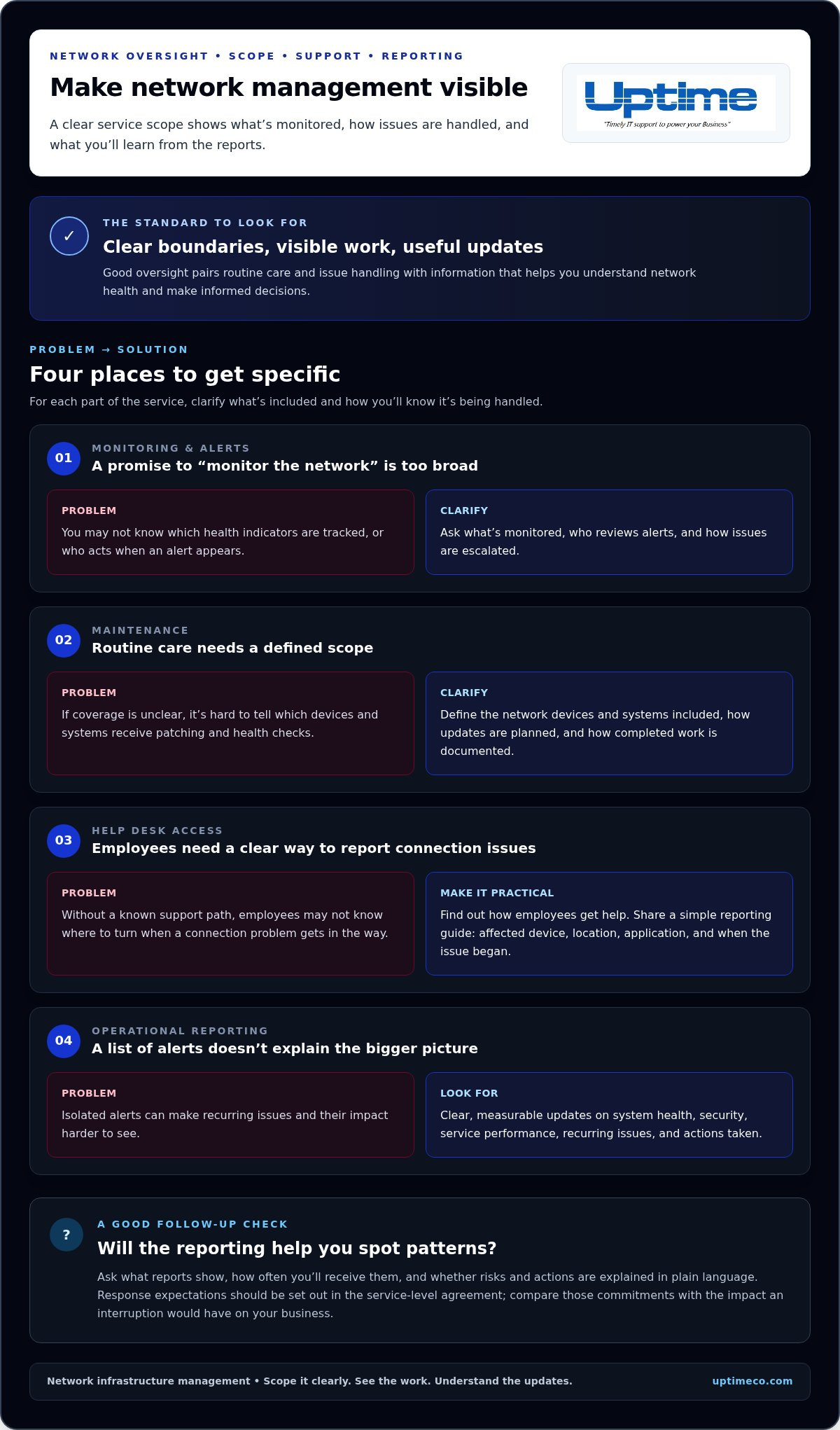
Good network oversight is visible in the work it prevents and the information it gives you. When assessing network infrastructure management services, look beyond a general promise to “monitor the network.” Check that routine care, issue handling, and reporting have clear boundaries. You should know what’s monitored, how alerts are reviewed, how employees get help, and what information you’ll receive.
Proactive monitoring continuously tracks system performance, alerts, and potential risks so problems can be addressed before users are affected. Pair monitoring with health checks and network analysis to identify recurring issues or capacity concerns. For maintenance, clarify which systems are included, how updates are planned, and how their status is reported.
- Monitoring and alerts: Ask which health indicators are tracked, who reviews alerts, and how issues are escalated.
- Maintenance: Define which network devices and systems are covered by patching and health checks, and how completed work is documented.
- Help desk access: Find out how employees report connection problems and get support. Share a simple guide for reporting the affected device, location, application, and time the issue began.
- Operational reporting: Look for clear, measurable updates on system health, security, service performance, and recurring issues, along with the actions taken.
Questions that reveal whether management is proactive
Ask what the reports show, how often you receive them, and whether they explain risks and actions in plain language. Response expectations should be set out in the service-level agreement. Compare those commitments with the impact an interruption would have on your business. A useful report helps you see patterns, such as repeated connection problems in one area, rather than just listing isolated alerts. Clear reporting gives you visibility while specialists handle routine oversight, helping you make informed decisions without tracking every alert yourself.
For a practical example of this approach, explore Uptime Co.’s network infrastructure management, which brings monitoring, analysis, reporting, and support together.
When Uptime Co.’s Network Infrastructure Services Make Sense
Uptime Co. provides network infrastructure services for businesses that need consistent oversight, clearer visibility into network health, or fewer technology issues pulling employees away from their work. A dedicated IT department isn’t the only way to get ongoing support. Uptime combines network analysis with monitoring from its 24 × 7 × 365 Network Operations Center, along with help desk support and vendor management.
This coordinated support helps businesses understand what’s happening across their networks, give employees a place to turn with IT issues, and coordinate with the vendors involved in keeping systems connected. Uptime supports small and midsize businesses throughout Orange County, including Irvine, Anaheim, and surrounding local areas.
Start by identifying where your team feels the most friction: recurring connectivity problems, limited visibility, or too much time spent coordinating support. Note how often the issue occurs, which teams or applications it affects, and what work is delayed. These details make it easier to determine whether network infrastructure management services fit your operational needs.
What a practical first step can look like
Start with an IT assessment and planning conversation. Bring a short list of the applications your team relies on, common network frustrations, business priorities, and upcoming changes that could affect connectivity. Uptime can use that context to understand your infrastructure and discuss how network analysis, monitoring, help desk support, and vendor management fit your needs.
You don’t need a technical blueprint to begin. A clear picture of what’s working, what’s getting in the way, and what your business is planning is enough. Explore Uptime Co.’s IT services to see how network support fits into a broader approach to managing business technology.
Make Your Network a Stronger Foundation
Your network should support the way your business works today and where you want it to go. Treat network infrastructure management services as an ongoing business decision: identify the systems and connections that matter most, then build support around those priorities.
Uptime brings over 30 years of proactive IT management experience, transparent reporting, and dedicated U.S.-based support to help businesses make informed technology decisions. Clear reporting shows what’s happening, while a capable team handles the technical oversight.
Ready to make your network easier to manage? Explore Uptime Co.’s network and managed IT services and take the next step toward a clearer view of your needs and a stronger plan for keeping work moving.
Frequently Asked Questions
What is the difference between network infrastructure management and IT support?
IT support usually helps people solve immediate technology problems, while network infrastructure management services focus on the shared connections those people rely on. If one employee can’t connect, that may call for user support. If several teams experience slow access to the same application, the network may need a broader review. The two functions work best when they coordinate.
What information should a business prepare for a network infrastructure assessment?
Bring a practical snapshot of how your team uses technology. List key applications, where they’re accessed, common connection complaints, known outages, and upcoming changes such as adding staff or moving offices. Include network diagrams or vendor details you already have, but don’t delay if records are incomplete. For an Orange County business, note which daily operations depend most on reliable connectivity.
How often should a business review its network infrastructure?
There’s no single review schedule that suits every business. Set a recurring check-in, such as during annual technology planning, and revisit sooner when your needs change. Hiring, adopting a new cloud application, changing offices, or repeated connectivity complaints can all be good prompts. Keep a short record of changes and recurring issues so each review starts with useful context.


