

What if a routine spreadsheet export exposes more donor information than your team intended to share? For nonprofits in Brea and Orange County, protecting donor data isn’t just about preventing a cyberattack. It’s also about making careful choices every day, from what you collect to who can access it. This guide explains how to protect donor data Brea nonprofits collect and use to support their mission.
It’s not always obvious which donor details are most sensitive or whether every staff member follows the same process. You don’t need a large IT team to build stronger habits. Start by documenting how information moves through your organization, then put practical safeguards in place.
We’ll cover how to limit sensitive information, manage staff access, handle records consistently, and prepare backups and an incident response plan. You’ll also see where managed IT and cybersecurity support can help keep those protections on track.
Key Takeaways
- Sort donor records into contact, gift, communication, and payment-related information to identify what needs the strongest protection.
- Map where donor data enters, which systems store it, and who can access it to spot unnecessary exposure.
- Learn how to protect donor data Brea nonprofits handle by tightening sign-in habits, limiting downloads, and reducing duplicate records.
- See how managed IT support, proactive monitoring, and backup and recovery can reinforce the safeguards your staff put in place.
What donor data should Brea nonprofits protect first?
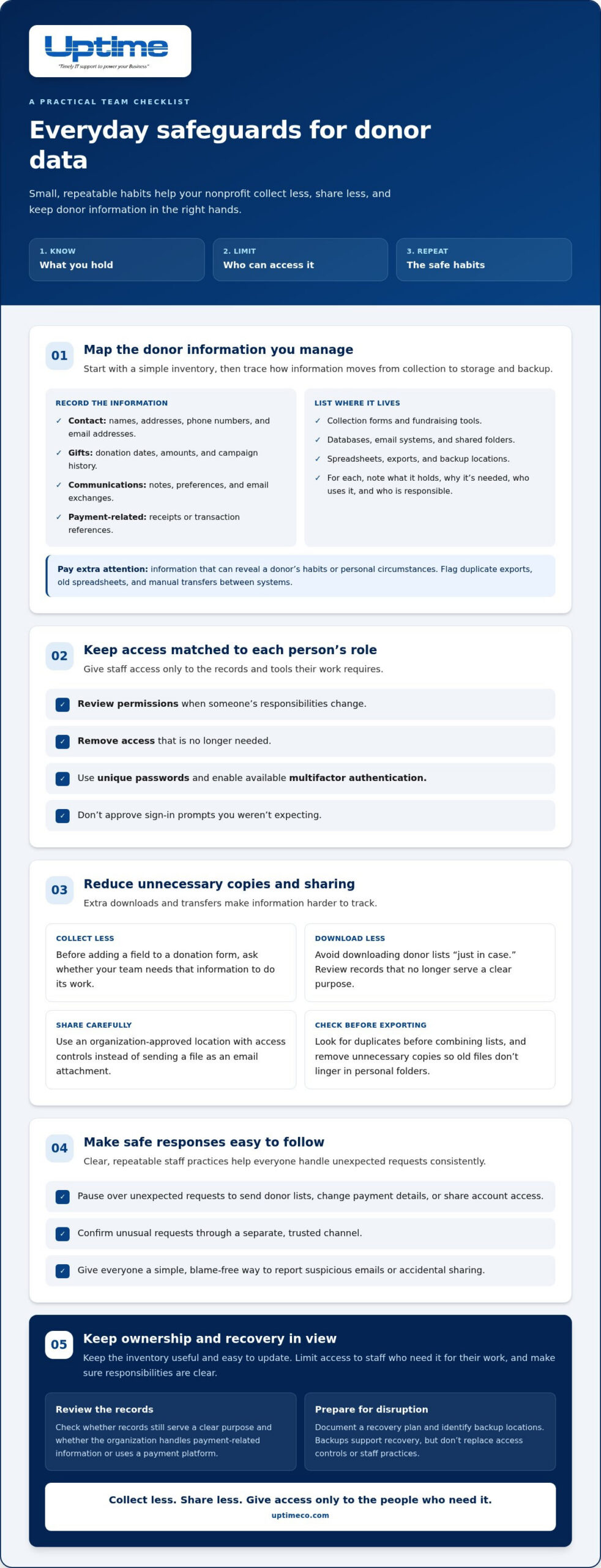
Donor data includes information your organization collects or creates while building relationships and processing gifts. It can include contact details such as names, addresses, phone numbers, and email addresses; gift records such as donation dates, amounts, and campaign history; and communications such as notes, preferences, and email exchanges. Payment-related records may include receipts or transaction references. Pay particular attention to information that reveals a donor’s habits or personal circumstances.
Start by tracing where information goes. A name might arrive through a website form, move into a fundraising database, then appear in an email list or an event spreadsheet. Each extra copy or transfer makes it harder to track access. A practical first step in how to protect donor data Brea nonprofits manage is to follow its path from collection through storage and backup. This is the foundation of Data Security: safeguarding information from inappropriate access, use, or disclosure.
Start with a simple donor-data inventory
Keep the inventory useful and easy to update. List each collection form, fundraising tool, database, email system, shared folder, and backup location. For each one, record what information it holds, why your team needs it, who uses it, and who is responsible for it. This helps uncover forgotten files and unclear ownership.
- Flag duplicate exports, old spreadsheets, and manual transfers between systems.
- Note whether your organization handles payment-related information or uses a payment platform.
- Identify records that no longer serve a clear purpose and review whether they should be retained.
Use the map to prioritize records that are widely shared or frequently copied. Limit access to the inventory itself to staff who need it for their work. Donors trust your organization with information so you can carry out its mission. Clear, consistent handling gives staff a shared understanding of what needs protection and where it lives.
How can a Brea nonprofit reduce donor-data exposure day to day?
Turn the inventory into a routine your team can follow. Give each person access only to the donor records and tools their role requires. Review permissions when responsibilities change, and remove access that’s no longer needed. Use unique passwords, enable available multifactor authentication, and don’t approve unexpected sign-in prompts.
Collect less, share less, and give access only to the people who need it. Before adding a field to a donation form, ask whether your team needs it to carry out its work. Avoid downloading donor lists “just in case.” When a file must be shared, use an organization-approved location with access controls instead of sending it as an email attachment. Before exporting or combining lists, check for duplicates and remove unnecessary copies so old files don’t linger in personal folders.
Turn safeguards into habits your team can follow
Make the process clear and repeatable. Train staff to pause over unexpected messages, especially requests to send donor lists, change payment details, or share account access. Confirm unusual requests through a separate, trusted channel. Give everyone a simple, blame-free way to report suspicious emails or accidental sharing. For more on technical protections, explore these cybersecurity services for Orange County. A documented recovery plan also helps your team prepare for disruptions; see this guide to backup and disaster recovery in Brea.
Consistency matters more than a complicated rulebook. Uptime Co. provides managed IT and cybersecurity support, including access management, proactive monitoring, and recovery measures, to help keep technical safeguards organized alongside staff practices. Learn more about managed IT and cybersecurity support.
When should Brea nonprofits bring in managed IT support?
Staff can set thoughtful rules, train teammates, and decide what donor information they need. Technical tasks can be harder to coordinate: reviewing alerts, maintaining security tools, managing system access, and checking that backups are usable. Consider managed support when these responsibilities are unclear, fall to someone without dedicated IT time, or span several platforms without consistent oversight.
Match the support model to your nonprofit’s needs
Look for gaps between your written practices and the systems that need ongoing attention. Your team may know to protect donor records but still need help administering security tools and tracking issues across devices, email, and cloud systems. Uptime’s Managed IT Services bring ongoing monitoring, maintenance, cybersecurity, and support together in a coordinated plan for organizations in Orange County.
Uptime’s cybersecurity services include firewalls, endpoint protection, email security, threat detection, vulnerability remediation, staff training, and proactive monitoring. Transparent reporting gives your organization clear information about system health, security, and service performance. Backup and recovery support adds another layer to your plan. Backups don’t replace access controls or staff practices, but they help your team prepare for disruption.
Let your mission and day-to-day needs guide technology decisions. Uptime’s vCIO team aligns technology planning with business goals and builds a technology roadmap. IT consulting for Orange County nonprofits can help frame those priorities. To see how Uptime can support your organization’s donor-data safeguards, explore Uptime Co.’s IT solutions. A useful plan brings people and technology together.
Make donor-data care part of your mission
Donor confidence grows through the choices your organization makes every day. Review how your fundraising work changes and whether your data practices still fit. Knowing how to protect donor data Brea nonprofits manage is a practical step toward supporting your mission with care.
When it’s time to strengthen your technology plan, Uptime Co. can help align IT decisions with the way your nonprofit works. A thoughtful plan keeps technology focused on your organization’s priorities, not just its immediate technical needs.
Make one practical improvement to your donor-data process, then build on it. Explore Uptime Co.’s managed IT and cybersecurity solutions to plan your next step.
Frequently Asked Questions
How can a small Brea nonprofit protect donor data?
Start with a common donor workflow and write down each handoff, such as who records a mailed gift, who reconciles it, and how corrections are made. Make improvements in manageable stages and assign someone to keep the process current. If system administration stretches staff capacity, ongoing IT support can help manage those technical tasks.
Should nonprofits store donor credit card numbers?
Ideally, your organization should avoid keeping full card numbers in its own files. Use a payment process designed to limit what staff must handle, and keep donor notes, spreadsheets, and email free of card details. Map which staff and systems touch payment information, including during refunds or reconciliation. This gives your team a clearer view of exposure without assuming a platform is secure by default.
What should a nonprofit do if donor information may have been exposed?
If exposure is possible, treat it as an incident that needs coordination, not an informal troubleshooting task. Alert the designated leader and IT support, note when the concern surfaced and which account or system may be involved, and preserve relevant records. Avoid forwarding sensitive files while investigating. A concise timeline helps the response team make decisions using shared, reliable information.
Can managed IT services help protect donor information?
Yes, especially when no staff member owns routine technology upkeep or knows where to escalate an alert. A managed IT partner can handle ongoing technical administration and give your team a defined support channel, while staff continue to follow internal handling procedures. Clear ownership helps everyone see what needs follow-up. Support can strengthen the process, but it can’t guarantee every incident is stopped.


