

A cloud bill can rise without delivering more business value. For a Brea business, optimizing cloud costs means matching resources and pricing to actual demand, then reviewing usage and spending regularly. This helps uncover idle resources, overprovisioning, poor visibility, and pricing complexity before they quietly drain your budget.
Cloud services make it easy to scale, but it can be difficult to see exactly what you’re paying for and whether each resource is earning its place. This article explains how cloud cost optimization works, why waste builds up, and how better visibility supports more informed decisions about cloud spending.
Key Takeaways
- Start with a cloud cost assessment that maps major charges to owners, workloads, and business needs.
- Look for idle resources and oversized capacity, then match cloud resources to actual demand.
- Improve visibility into usage and pricing so you can understand what drives each charge.
- Use managed IT and cloud services to support ongoing cost reviews and more informed infrastructure decisions.
1. What is Cloud Cost Optimization?
Cloud cost optimization aligns spending with business value. For a Brea business, start by mapping charges to teams, applications, environments, instances, and storage. Then create a roadmap that ranks changes by potential savings, operational risk, and business priorities. The goal is smarter capacity decisions, not indiscriminate cuts.
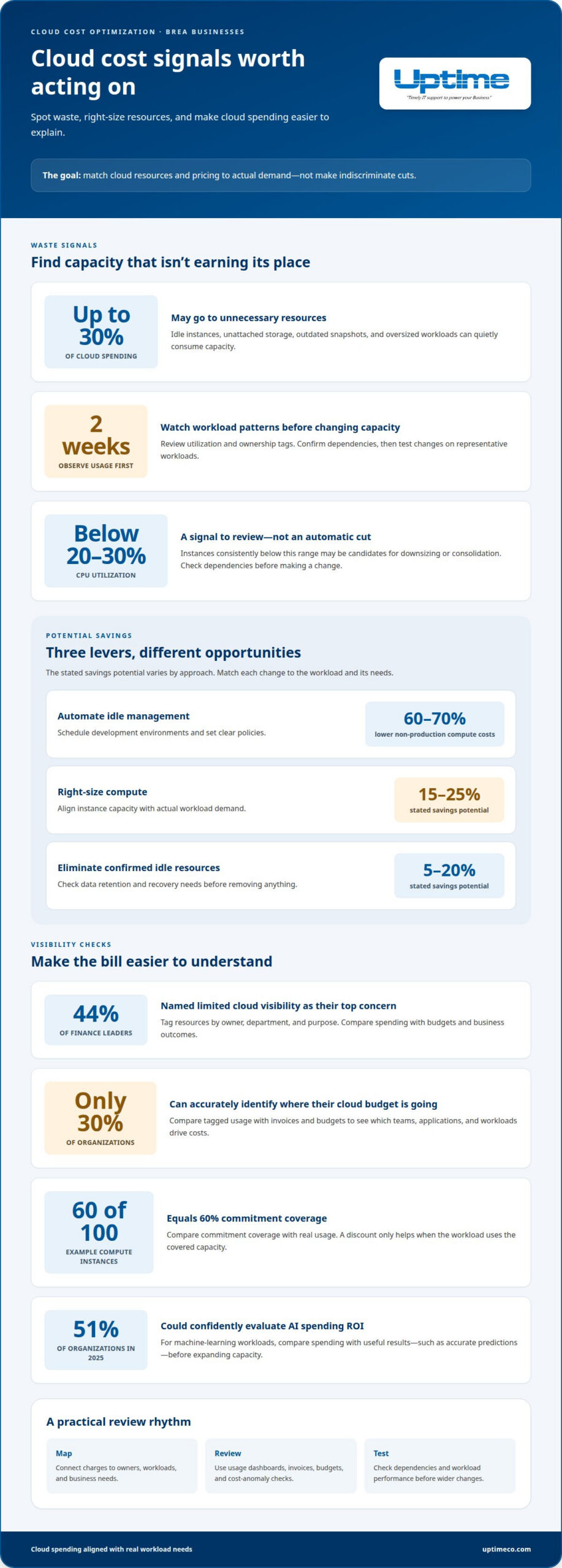
Visibility makes that roadmap actionable. A survey found that 44% of finance leaders named limited cloud visibility as their top concern. Tag resources by owner, department, and purpose, then compare spending with budgets and outcomes. For optimizing cloud costs for a Brea business, this shared view helps finance and technical teams see what each workload supports.
Measure efficiency by useful results, not the bill alone. Track cost per completed transaction or customer served. Only 51% of organizations could confidently evaluate the return on investment of AI spending in 2025. For machine-learning workloads, compare spending with useful results, such as accurate predictions, before expanding capacity. That helps you make more informed decisions about cloud spending.
Are there California or federal tax credits for business cloud computing expenses? Cloud use alone doesn’t establish eligibility; potential incentives depend on business activity and applicable tax rules. What cloud cost optimization services are available in Brea? Assessments and implementation roadmaps can help identify opportunities and set priorities. What are the risks of cloud cost cutting? Removing capacity without reviewing security, recovery, and workload demands can harm performance or reliability. Test changes before rolling them out more widely.
Assessment pricing depends on the systems, workloads, and roadmap involved. A tailored quote provides the specific cost.
2. Cloud waste from overprovisioning and idle resources
Cloud waste often hides in infrastructure that keeps running after its purpose ends. Idle instances, unattached storage, outdated snapshots, and oversized workloads all consume capacity. Organizations may waste up to 30% of cloud spending on unnecessary resources. Start by listing each resource, its owner, its workload, and its recent usage patterns.
To identify unused resources and oversized instances, review utilization data and ownership tags. Observe workload patterns for at least two weeks before changing capacity. Instances consistently below 20-30% CPU utilization may be candidates for downsizing or consolidation. Confirm dependencies first, then test changes on representative workloads. This protects the ability to scale when demand shifts.
Make removal a controlled action, not a blanket rule. Check whether an unattached volume supports a recovery plan or retained data before deleting it. Remove confirmed zombie resources, then automate idle management with schedules for development environments. Automated scheduling can reduce non-production compute costs by 60-70%. Set clear policies, and monitor results after each change.
Brea businesses can optimize storage by identifying infrequently accessed data and moving eligible files to lower-cost tiers or archive solutions. Compare database capacity with actual demand, and review data-transfer patterns because moving data between services or locations can add charges. Keep frequently used data accessible, and test database changes against workload performance.
Match cost strategies to workload needs. Rightsizing compute has a stated savings potential of 15-25%, while eliminating idle resources has a stated savings potential of 5-20%. Discounts can help with stable usage, but avoid commitments for workloads that change often. For a structured review of infrastructure and resource usage, explore cloud services.
3. Visibility and cloud pricing complexity
A cloud bill can show total spending without explaining which team, application, or decision drove it. Only 30% of organizations can accurately identify where their cloud budget is going. Add tags for owners, departments, environments, and workloads. Then compare tagged usage with invoices and budgets. This gives finance and technical teams a clearer view of actual demand.
Pricing adds another layer. Compute may use pay-as-you-go rates, discounted commitments, or spot pricing, while storage and data transfer follow separate charging rules. Usage beyond a contracted quantity can trigger premium costs. Build a simple view of each application’s architecture, resource use, commitment coverage, and transfer patterns. For example, if 60 of 100 compute instances have discounted commitments, coverage is 60%. That figure helps reveal whether commitments match real usage.
Small businesses can compare reserved instances and savings plans for stable workloads, then consider spot instances for work that can tolerate interruptions. Before committing, review historical usage and expected demand. A discount saves money only when the workload uses the covered capacity. Avoid locking variable applications into a plan that doesn’t match their usage patterns.
Use native cloud platform dashboards to review current and historical usage, recommendations, and cost anomalies. Set a regular review cadence, assign each cost category an owner, and investigate unusual changes before they become routine. Track commitment coverage and utilization alongside total cloud spending. For help aligning cloud architecture and usage with business needs, explore cloud services.
Uptime: Managed IT Services
Uptime Co. helps businesses turn cloud cost findings into practical infrastructure decisions through Managed IT Services and Cloud Services. Consider support when cloud charges are hard to trace, resource changes feel risky, or your team needs a clearer workload management plan.
A focused review connects resource usage with operational needs, cybersecurity, and network infrastructure. That broader view matters: cutting capacity without considering application dependencies or protection requirements can create new problems. Uptime Co.’s Cybersecurity Solutions help keep security needs in view as your cloud environment changes.
If cloud spending is difficult to explain or manage, contact Uptime Co. to discuss your business’s IT needs.
Build a cloud plan that keeps pace
Cloud decisions should support the work your business needs to do next. For a Brea business, optimizing cloud costs means aligning spending with operational priorities, not simply chasing a lower bill.
Choose a business-critical workload as your next step. Define success from the users’ perspective, identify who owns the decision, and consider how changes could affect service quality. This gives your team a practical way to keep its cloud plan aligned as needs shift.
Uptime Co. offers Managed IT Services, Cybersecurity Solutions, and Cloud Services. If your team wants help turning cloud spending questions into a workable plan, contact Uptime Co. to discuss cloud costs.
Start with the priority that matters most. A clear next step makes cloud decisions easier to manage and keeps them connected to what your team is building.
Frequently Asked Questions
What is Cloud Cost Optimization?
Cloud cost optimization is an ongoing way to align technology spending with useful business outcomes. For example, compare the cost of processing an order with the number of successful orders completed, rather than judging a system by its bill alone. This helps you see whether a change improves efficiency or merely shifts expenses while reducing service quality.
Do cloud budgets automatically stop spending?
No. A budget generally tracks spending against a threshold; it doesn’t automatically switch off cloud resources. Set alerts for unexpected increases, then decide who investigates them and how quickly. An alert, for example, can prompt your team to check whether a planned test, new application release, or unexpected workload caused the change.
Is multi-cloud cheaper than using one provider?
Not by default. Running applications across multiple providers can add complexity, including separate billing views, duplicated tools, and data-transfer charges. Compare each workload’s full operating needs before moving it. If you use multiple platforms, assign clear ownership and review costs consistently so added flexibility doesn’t obscure total spending.
What is the fastest way to reduce cloud costs?
Investigate the largest recent billing change first. Compare the current bill with the previous period, identify the service or workload behind the increase, and confirm its owner. A temporary test environment left running may be a quick fix, while a production workload needs careful review. Prioritize clear, low-risk causes before changing application capacity.
What are the best ways for Brea businesses to reduce AWS, Azure, and Google Cloud costs?
Use a consistent review process across AWS, Azure, and Google Cloud. Apply common labels for department, application, and environment, then compare equivalent workloads and data-transfer patterns. Review each provider’s billing dashboard and recommendations, but validate suggested changes against application needs. This makes cross-platform decisions easier to explain and helps teams identify duplicated services or uneven resource use.


