
Email security is more than a spam filter. Brea email security solutions can combine gateway filtering, built-in email platform protections, and tools that detect threats after delivery. The goal is to catch phishing, suspicious links, malicious attachments, and account compromise before they disrupt your business.
A single filter may seem simpler, but layered protection can cover more points in the email journey. Compare what each option detects, how it works with your email platform, and who handles alerts and follow-up. This guide explains the practical trade-offs and when managed email security support can help you choose an approach that fits your team’s security needs.
Key Takeaways
- Look beyond filtering: assess how email encryption, archiving, and data loss prevention support your information-handling needs.
- Compare solutions by how well they fit your email platform, security priorities, and day-to-day workflow.
- Map out who will review alerts, update protections, and respond to threats before choosing a solution.
- Consider managed email security when ongoing oversight would stretch your team’s time or expertise.
What is Email Security?
Email security can combine filtering, encryption, archiving, and data loss prevention (DLP) to protect messages and accounts. When comparing Brea email security solutions, start by listing the information employees send, such as customer records or financial documents, and the controls those workflows require.
Requirements vary among Brea businesses handling sensitive data. Identify obligations tied to your industry, data types, contracts, and customer commitments, then align access, encryption, retention, and incident procedures with those needs.
Microsoft 365 and Google Workspace include native email protections that can contribute to a layered setup. Available capabilities depend on configuration and plan; consider additional detection when your threat profile calls for it.
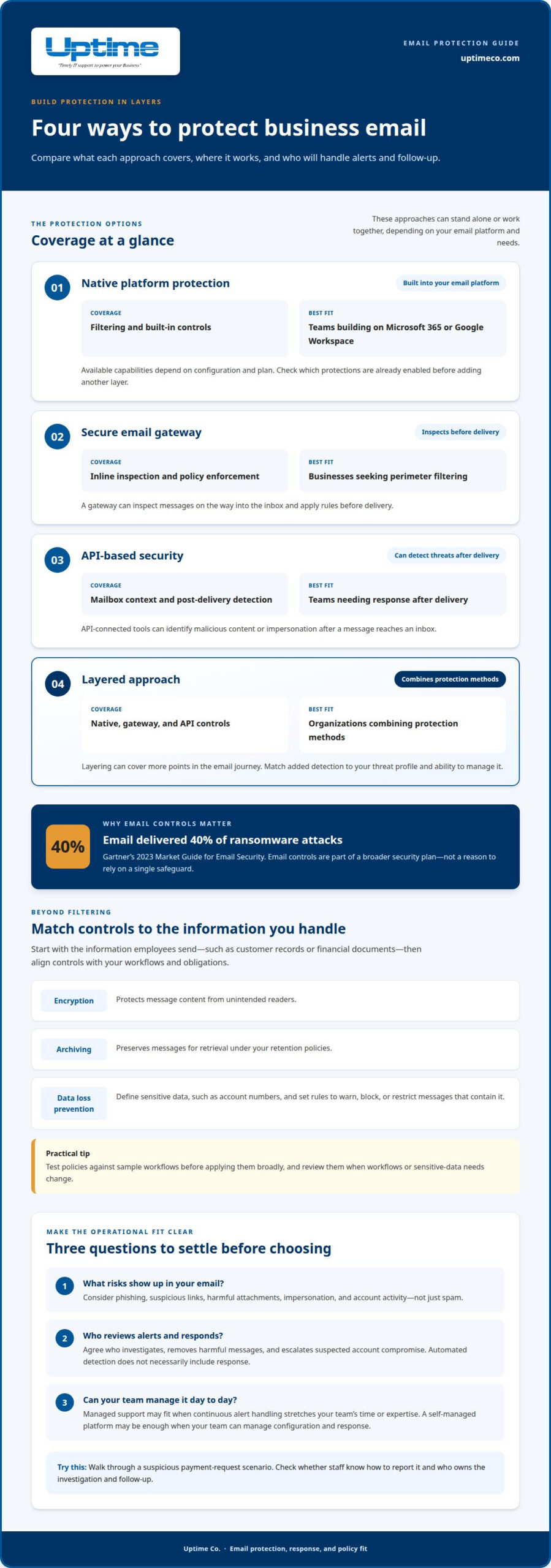
Encryption protects message content from unintended readers, while archiving preserves messages for retrieval under your retention policies. DLP adds another control point: define sensitive data, such as account numbers, then set rules to warn, block, or restrict messages that contain it. Test policies against sample workflows before applying them broadly.
| Option | Coverage | Best fit |
|---|---|---|
| Native platform protection | Filtering and built-in controls | Teams building on Microsoft 365 or Google Workspace |
| Secure email gateway | Inline inspection and policy enforcement | Businesses seeking perimeter filtering |
| API-based security | Mailbox context and post-delivery detection | Teams needing response after delivery |
| Layered approach | Native, gateway, and API controls | Organizations combining protection methods |
Choose Brea email security solutions based on your sensitive-data policies, email platform, and capacity to manage alerts and remediation.
Gartner’s 2023 Market Guide for Email Security reports that email delivered 40% of ransomware attacks. This reinforces the value of treating email controls as part of a broader security plan rather than relying on a single safeguard. Review how filtering, encryption, archiving, and DLP work together, and confirm that alert handling and remediation responsibilities are clear.
Review policies when workflows or sensitive-data needs change. Testing helps confirm that controls remain practical without disrupting legitimate messages.
Email security solution selection criteria
Compare platforms by the attacks they detect, the controls they apply, and the response they support. For Brea organizations, begin with your email platform, common social-engineering risks, and ability to investigate a possible compromise.
Phishing and Spam Protection
Phishing uses deceptive messages to prompt actions, while spam filtering focuses on unwanted bulk email. Solutions vary in how they analyze sender details, message content, and suspicious links. Microsoft 365 and Google Workspace offer platform protections; specialist tools can add detection layers. Small businesses in Orange County can compare those platforms with vendors such as Proofpoint, focusing on coverage, alert clarity, and how protections fit existing email workflows.
Review reported phishing attempts, suspicious messages, and the protections already enabled in your email platform. Use this picture to identify gaps and prioritize defenses against the threats your team actually encounters.
Malware and Business Email Compromise Protection
Malware protection focuses on harmful attachments and links. Business email compromise often relies on social engineering, such as a message impersonating an executive to request a payment or sensitive file. These attacks may contain no malicious attachment, so compare how tools detect suspicious sender behavior and account activity, not just how they scan files.
Look for clear response and remediation steps: who investigates an alert, how a harmful message can be removed after delivery, and how compromised accounts are handled. Walk through a scenario, such as a finance employee receiving an unexpected payment request, to see whether staff know how to report it.
Choose controls based on your risks, email setup, and response capacity. A cybersecurity assessment can help connect those priorities to a practical protection plan.
Managed email security services
Businesses in Brea can combine Microsoft 365 or Google Workspace protections with a secure email gateway, API-based detection, or both. Managed services add ongoing configuration, alert review, and response coordination around those tools. The key advantage is operational: your team has a defined process for handling a suspicious message, not just a security platform that flags it.
A gateway, for example, can inspect messages before delivery, while API-connected tools can identify malicious content or impersonation afterward. A managed provider can help configure controls for your cloud email environment, tune detection, and coordinate remediation when a threat reaches an inbox. The precise scope depends on the service arrangement.
Implementation starts by mapping email accounts, platforms, and existing controls. The provider then plans deployment, connects the chosen tools, and tests alerts and message actions. Agree on who receives alerts, who can remove messages, and how suspected account compromise is escalated. A simulated phishing email can clarify the reporting process.
For Brea organizations, a managed provider can connect email protection with broader IT and cybersecurity support. Compare providers by how they handle alert review, investigation, and follow-up, not just tool deployment. Confirm that responsibilities for escalation and remediation are clearly defined; automated detection alone does not necessarily include either.
Managed email security fits organizations that lack time or in-house expertise for continuous alert handling. If your team can manage configuration and response, a self-managed platform may be enough. For help aligning email protections with broader managed IT services, define your email platform, key risks, and response needs first.
Uptime Co.: Cybersecurity Solutions
Uptime Co. helps businesses strengthen email protection through Cybersecurity Solutions. Turn to Uptime when you need help aligning email controls with broader security priorities or managing alerts and response internally is becoming difficult.
Uptime’s Managed IT Services support the wider technology environment, while Cloud Services and Network Infrastructure address systems your email depends on. This connected approach brings email protection into the same conversation as platform configuration, access, and operational needs. Start by identifying your email platform, the sensitive information it handles, and who manages suspicious-message response. These details help focus the next steps.
To build a more coordinated security approach for your Brea business, contact Uptime Co.
Turn Your Email Security Plan Into Action
Turn your priorities into a clear ownership plan: decide who maintains settings, reviews alerts, and coordinates action if an account is compromised. Record which business processes depend on email and what information needs extra care. This plan can help your team spot gaps as platforms, people, and workflows change.
The right Brea email security solutions should fit how your team works, not add complexity without a clear purpose. If you want help mapping your priorities to a practical security approach, contact Uptime Co. about email security. Bring your email platform, current concerns, and response responsibilities into the conversation. A focused next step can make your decisions easier to manage and give your team a clearer path forward.