The best IT fix is often the one you never notice. Proactive IT support in Brea helps businesses identify potential problems early through monitoring, maintenance, and timely software updates, reducing the risk of disruption. The focus shifts from reacting to outages to preventing avoidable issues.
If technology problems keep interrupting work, a preventive approach can help. You want fewer surprises, clearer priorities, and systems that keep pace with your business. This article explains what proactive support includes, how it differs from break-fix help, and what to consider when choosing a managed IT partner. It also covers how monitoring, patch management, and system reviews support daily operations and future growth.
Key Takeaways
- Understand how managed IT support can help Brea businesses move beyond a fix-it-afterward approach.
- See how ongoing monitoring can surface warning signs before they disrupt day-to-day work.
- Learn which measures, including patch coverage and downtime, can help you track whether prevention is working.
- Find out when a managed IT partner can help strengthen your systems and plan for what’s next.
Do you provide managed IT services for businesses in Brea?
Yes. Businesses in Brea can use managed IT services for ongoing network administration, cybersecurity, and maintenance. A proactive plan connects daily support with strategic technology decisions.
Managed IT for Brea and Orange County
For businesses in Brea and Orange County, managed services can cover network infrastructure, cloud systems, cybersecurity, and routine maintenance. The right scope reflects how your team works. A school district may prioritize reliable access to shared systems, while a nonprofit may depend on cloud tools and endpoint protection. Start by identifying your critical systems, users, and recurring technology issues.
Choosing a Proactive IT Provider
Managed IT providers in Brea offer proactive support through monitoring, maintenance, and a defined response process. Compare how each provider handles continuous monitoring versus business-hours monitoring, patching, and escalation. Ask for a practical example, such as how a failing endpoint would be detected and addressed. For an existing IT team, a co-managed arrangement can add coverage without replacing in-house staff.
Cybersecurity starts at the endpoint, where laptops and workstations need protection and timely updates. Vulnerability reviews and patch management help address security gaps before they contribute to a breach. For example, updates can be prioritized for devices that access sensitive business data.
Change management helps prevent updates from causing unnecessary disruption. A sound rollout identifies critical systems, schedules a maintenance window, and informs affected users. For a major software update, testing in an isolated environment can reveal compatibility issues before deployment. Automated maintenance helps keep routine updates on track.
Proactive support can help Brea organizations support compliance efforts with timely updates, vulnerability reviews, and maintenance records. Requirements vary by industry and the data handled. Schools, municipalities, healthcare organizations, and law firms should map IT controls to their specific obligations.
Continuous monitoring and early problem detection
Monitoring looks for warning signs before they become emergencies. Its value depends on pairing alerts with clear maintenance and response steps.
Continuous System Monitoring
Monitoring tracks signals such as storage capacity, device health, and unusual activity. Repeated endpoint errors, for example, can prompt investigation before users lose access. A useful plan identifies critical systems, sets alert priorities, and specifies who receives each notification. Align those priorities with business goals so essential services receive attention first.
Preventive Maintenance
Preventive maintenance turns monitoring signals into practical action. Teams can review hardware health, apply software updates, and address recurring warnings before they cause disruption. Automated maintenance helps keep routine tasks consistent, while planned update windows reduce surprises for employees. Track unresolved alerts and recurring faults, as both can signal a need for deeper review.
Remote Monitoring and Technical Support
Remote monitoring lets technical teams review system alerts without an onsite visit. When an issue appears, support staff can assess logs, identify affected devices, and determine the next response. A slow workstation may need a software check, while repeated network errors may call for broader investigation. Clear escalation steps connect each alert to the appropriate response.
Around-the-Clock Monitoring
24/7 monitoring means systems can be observed beyond standard office hours. It doesn’t automatically explain how quickly every alert receives action, so define alert ownership, escalation paths, and emergency procedures. Ask which systems are monitored continuously and how urgent events are handled. Review the monitoring and maintenance approach to see how it fits your operating hours and business goals.
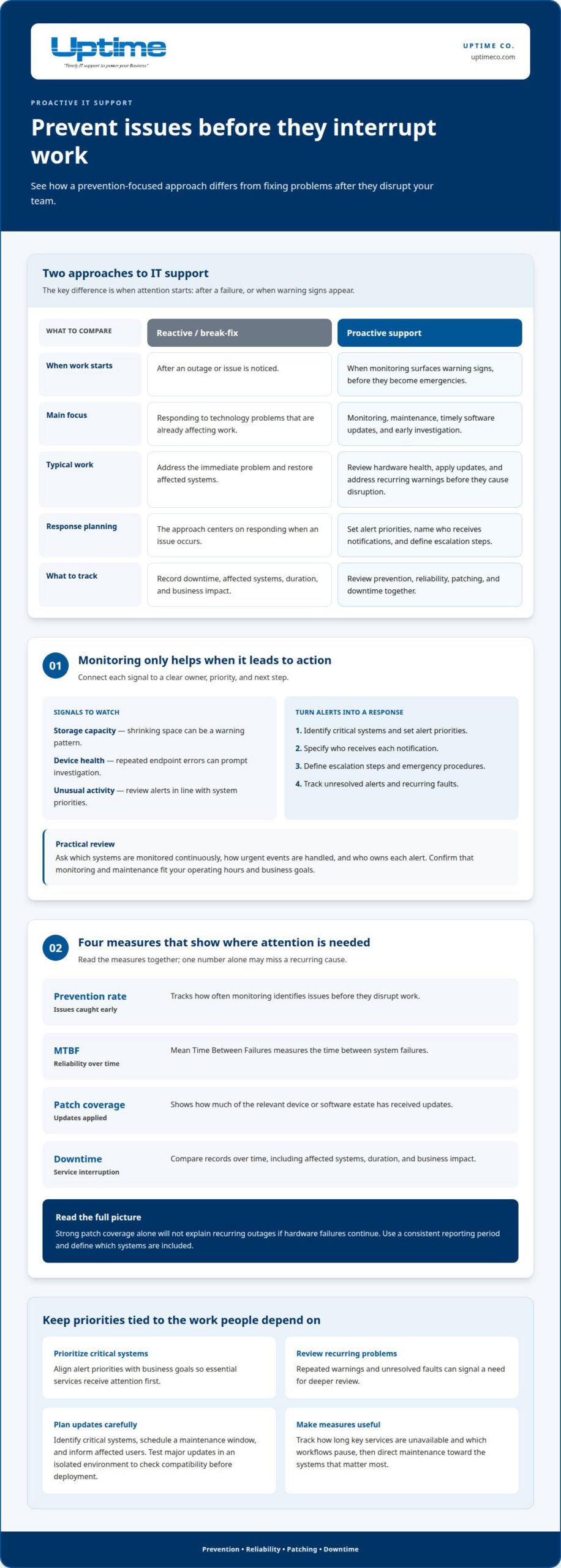
What does “proactive IT support” really mean?
It means using measurable signals to improve systems instead of waiting for failures. Track prevention, reliability, patching, and downtime together to identify where attention is needed.
Incident Prevention and Downtime Metrics
Incident prevention rate tracks how often monitoring identifies issues before they disrupt work. Mean Time Between Failures (MTBF) measures the time between system failures. Patch coverage shows how much of the relevant device or software estate has received updates. Review these measures together: strong patch coverage alone will not explain recurring outages if hardware failures continue. Use a consistent reporting period and define which systems are included.
Reducing Downtime and Disruptions
Proactive monitoring can flag warning patterns, such as repeated service errors or shrinking storage space. Teams can investigate, prioritize critical systems, and schedule corrective work before a small fault interrupts operations. Compare downtime records over time, noting the affected systems, duration, and business impact. This helps identify recurring causes and direct maintenance toward the systems that matter most.
Downtime and Business Productivity
Downtime affects more than system availability. A disconnected phone system can delay customer responses, and an unavailable shared drive can stall approvals. Track how long key services are unavailable and which workflows pause. MTBF and downtime trends show whether reliability is improving, while incident prevention adds context about issues addressed before users notice them. Set priorities around the work your team depends on most.
Want to connect these measures to a practical IT plan? Talk with Uptime about managed IT support.
Uptime
Uptime Co. helps Brea businesses align IT support with operational priorities. If recurring issues or changing needs are creating gaps, proactive IT support in Brea can bring technology planning and everyday support into focus.
Uptime Co. offers Managed IT Services, Cybersecurity Solutions, and Cloud Services. Start by identifying the systems your team depends on and what you want technology to support next. That gives your conversation a clear, practical direction.
Ready to discuss your business needs? Contact Uptime Co. to explore a practical next step.
Make your next IT move count
Turn your technology priorities into a practical plan. Before choosing a next step, note which systems your team relies on, where recurring issues slow work, and what changes are coming. This gives your IT conversation a clear starting point. For Brea businesses, proactive IT support works best when it reflects real operational needs, not a generic checklist.
Uptime offers Managed IT Services, Cybersecurity Solutions, and Cloud Services to help businesses manage their technology. The right mix depends on your priorities, whether you need better day-to-day oversight or support for a planned technology shift. Start with the outcome you want, then discuss which areas need attention first.
Ready to talk through your priorities? Contact Uptime about IT support. A focused conversation can help you choose a clear next step and move forward with confidence.
Frequently Asked Questions
How quickly can you respond to IT support requests in Brea?
Uptime provides rapid response for critical issues and same-day support for standard requests, with response times defined by the service-level agreement. For example, a business reporting a critical system outage follows the critical-issue response path, while a routine access request follows standard support procedures. The agreed service levels clarify how requests are prioritized and handled.
What does proactive IT support include for businesses in Brea, California?
Proactive IT support in Brea can cover servers, networks, workstations, cloud services, cybersecurity, backups, and help-desk support. The right mix depends on your operating needs. A business planning to move applications to the cloud, for example, may pair cloud management with backup planning so systems and data are addressed together.
What proactive IT support plans and services are available in Brea?
Uptime offers Managed IT Services, Cybersecurity Solutions, Cloud Services, and Network Infrastructure for businesses in Brea and Orange County. These services can be shaped around your environment and priorities rather than a one-size-fits-all package. A growing organization may need technology planning alongside ongoing support as it adds users or adopts new systems.
How do Brea IT providers monitor systems and respond to issues after hours?
Uptime provides 24/7 monitoring and support. After-hours coverage gives businesses a way to identify issues outside the standard workday and route them through defined support procedures. Ask how alerts are prioritized, who receives them, and how the service-level agreement describes response expectations. Those details help clarify what happens when an issue appears overnight.
What are the benefits of proactive IT support compared with break-fix IT services?
Proactive support helps teams plan technology work before an urgent repair dictates the schedule. Identifying aging infrastructure, for example, gives a business time to plan an upgrade around its operations. Break-fix support addresses faults after they occur. The difference matters most when disruption affects customer service, internal deadlines, or essential business systems.