
A Microsoft 365 issue can stall more than one task. For Microsoft 365 support in Brea, businesses can look to managed IT services for help with cloud tools, user access, security, and day-to-day troubleshooting. The right kind of support depends on what’s broken and how widely it affects your team.
It’s easier to get useful help when you can describe the issue clearly. Note which app is affected, what you were trying to do, and whether other people have the same problem. This article explains the common types of Microsoft 365 support to consider, how to narrow down what your business needs, and where Uptime’s managed IT and cloud services fit. Get a clearer path from disruption to a practical next step.
Key Takeaways
- Match the support you seek to the issue, whether it affects one person, several users, or access to cloud tools.
- When you submit a support ticket, include clear contact details and a concise description of the problem.
- Watch your phone and email for a reply from the assigned support agent so you can keep the request moving.
- For broader IT needs, Uptime’s managed IT services and cybersecurity solutions can support your business beyond an individual troubleshooting issue.
Microsoft 365 support Brea
Microsoft 365 support in Brea helps businesses resolve problems with Microsoft’s workplace apps and accounts. It can cover Outlook email, Teams meetings, shared files, and user access. The right support depends on the issue: a single Outlook sign-in problem calls for a different investigation than missing shared files across a department.
Support also considers how Microsoft 365 connects with daily work. For example, a staff member may open a Teams link but lack access to its SharePoint files. That points to a permissions or account issue, not simply a meeting problem. When asking for help, include the task and exact error message so the team can distinguish symptoms from the underlying issue.
Support can involve user accounts, access settings, email flow, file sharing, or coordination between Microsoft 365 and a business network. The scope matters: one employee unable to open Outlook may need account and device checks, while several employees locked out of the same shared folder may need its access settings reviewed. Share a specific example of what’s affected.
For Microsoft 365 support in Brea, businesses should consider both immediate fixes and recurring IT needs. A quick correction may restore access, while repeated account or sharing problems can point to a wider configuration challenge. Keep a short record of when the issue started and any recent changes. That gives a support professional a clearer starting point and helps show whether the problem is isolated or part of a larger pattern.
Technical support
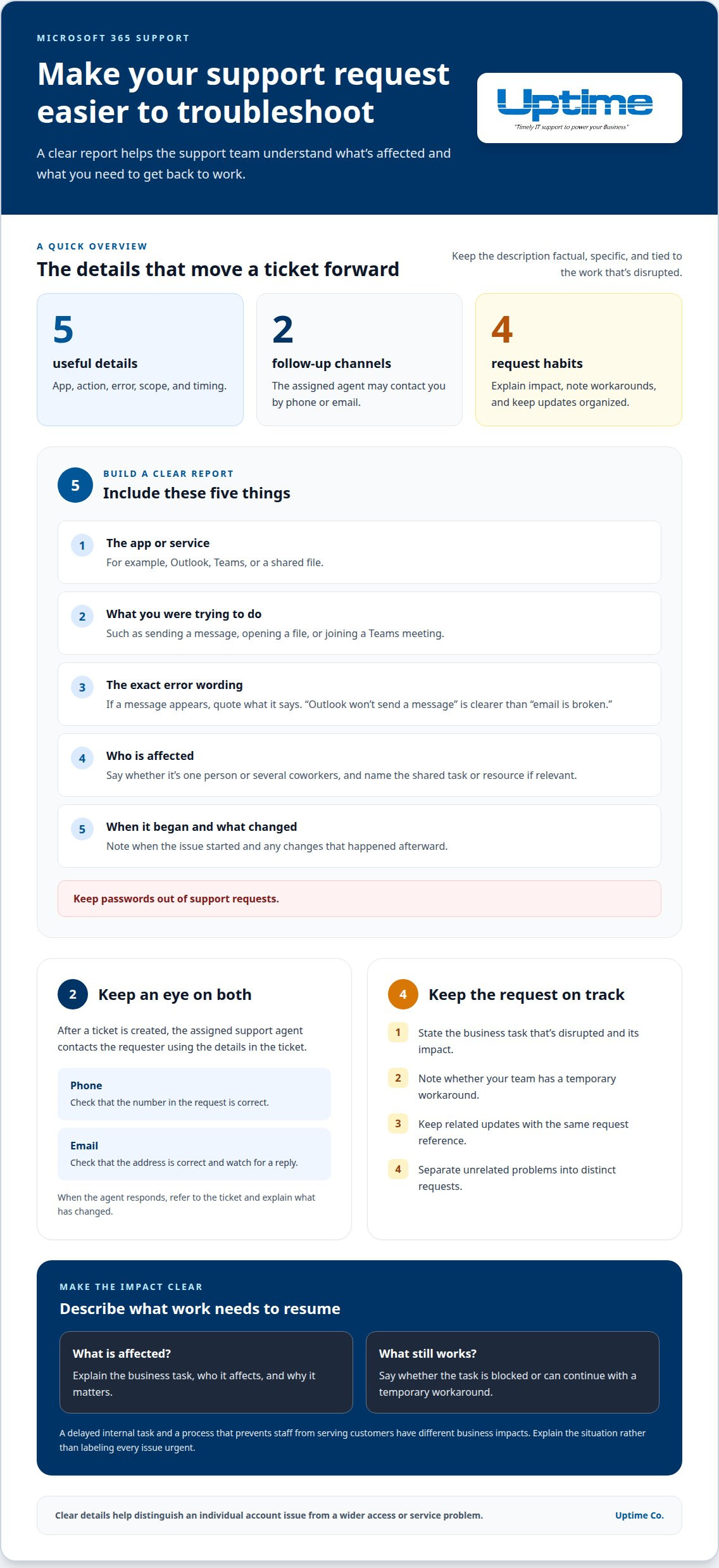
Technical support is help that investigates and resolves a specific Microsoft 365 problem. A useful request gives the support agent enough detail to understand the issue and follow up. Describe the affected app, the task you were trying to complete, and the message on screen. For example, “Outlook won’t send a message” is clearer than “email is broken.”
After a Microsoft 365 support ticket is created, an assigned support agent contacts the requester by phone or email using the details in the ticket. Keep both channels in view. If the phone number or email address has a typo, follow-up could miss you. When the agent responds, refer to the ticket and explain what has changed since you submitted it.
A focused report makes troubleshooting easier to organize. Include:
- The Microsoft 365 app or service involved.
- The action that led to the problem, such as opening a file or joining a Teams meeting.
- The exact error wording, if one appears.
- Whether the issue affects one person or several coworkers.
- When it began and whether anything changed afterward.
Keep the description factual, and never include passwords in a support request. If several people are affected, name the shared task or resource. This helps distinguish an individual account problem from a wider service or access issue. Add updates to the existing request when possible, so the support team can follow the sequence in one place.
If troubleshooting reveals a problem beyond Microsoft 365, explore business technology support for a broader path forward.
Contact support
A support request turns a business disruption into a clear description of the help needed. Before submitting one, identify what work your team needs to resume and what still works. This keeps the request focused on the outcome, not just the symptom. For example, explain whether a task is completely blocked or can continue with a temporary workaround.
Describe the business impact to convey the request’s priority. A delayed internal task is different from a process that prevents staff from serving customers. Avoid labeling every issue urgent. Explain what is affected and why it matters, so the request reflects your team’s actual needs.
Use these steps to make the request easier to manage:
- State the business task that’s disrupted and its impact.
- Note whether your team has a temporary workaround.
- Keep related updates with the same request reference.
- Separate unrelated problems into distinct requests.
Keep related updates, including any changes in the situation, in the same request. This helps your team track what’s needed next without mixing separate problems together.
If the issue points to broader business technology needs, take the next support step with Uptime Co.
Uptime
Uptime Co. helps Brea businesses connect Microsoft 365 issues with their wider IT needs. When access problems overlap with network, security, or backup concerns, a broader view can help clarify what needs attention. Managed IT Services and Cloud Services support businesses working through technology challenges across their operations.
For example, repeated trouble accessing shared work files may involve more than one app. Cybersecurity Solutions can address security needs, while Network Infrastructure and Backup & Recovery support other parts of your business technology environment. The right focus depends on the issue and its impact on your team.
If you need help connecting a Microsoft 365 problem to broader business IT needs, contact Uptime Co. to discuss the situation.
Make your next IT decision count
Use your next Microsoft 365 issue as a chance to clarify what your team needs from its technology. Which workflows depend on reliable access? Where do handoffs slow down? What would make everyday collaboration easier? Those answers can help shape a more useful support conversation, beyond one isolated interruption.
For Microsoft 365 support in Brea, bring a clear picture of the business impact and the outcome you want. A practical next step is to discuss how the issue connects with your wider IT environment and what deserves attention first. That gives your team a stronger starting point for making informed decisions, without losing sight of daily work.
Contact Uptime Co. for support and take the next step with confidence.