
The fastest way to support growth isn’t always to buy a bigger server. Scalable cloud infrastructure in Orange County lets organizations adjust cloud resources as needs change. You can increase a server’s capacity, distribute workloads across more servers, or combine both approaches.
Cloud scaling differs from expanding traditional infrastructure in how resources are added and managed, and how the setup balances performance, cost, and reliability. This guide explains cloud scalability, vertical, horizontal, and diagonal scaling, and where each approach fits. It also compares cloud infrastructure with traditional systems, helping you weigh the trade-offs and identify what matters for your organization’s growth.
Key Takeaways
- Plan cloud capacity around workload trends, then monitor performance and usage to keep resource allocation aligned with demand.
- Choose vertical scaling to expand a single server, horizontal scaling to distribute workloads, or diagonal scaling to combine both.
- Cloud resources can typically scale quickly, while expanding on-premises physical infrastructure may take weeks or months.
- Build for growth from the start: automation and thoughtful architecture can help balance performance, reliability, and cost.
What is Cloud Scalability?
Cloud scalability is the ability of cloud services to adjust resources as an organization’s needs change. A business can increase computing capacity or reduce it when workloads require less. For example, an online platform can allocate more resources as customer activity grows. Scalability supports planned, sustained growth; elasticity adjusts resources dynamically as demand shifts.
For organizations in Brea, scalable cloud infrastructure should match capacity to actual workloads rather than simply add machines. Monitor response times, usage, and application adoption, then adjust resources as those signals change. Right-sizing aligns computing resources with workload needs. Scheduled scaling can match capacity to predictable busy periods, while caching and architecture tuning can reduce unnecessary demand.
Cloud services may use pay-as-you-use models, helping reduce waste and avoid large upfront infrastructure purchases. That flexibility still requires active cost management. For example, leaving capacity allocated after a seasonal workload ends can waste resources. Review usage patterns regularly and reduce resources when demand falls.
FinOps brings financial accountability to cloud operations. Teams use it to understand cloud spending, optimize resource allocation, and choose suitable pricing models. Pair usage analytics with performance monitoring so cost reductions don’t undermine reliability. The goal is a deliberate balance: enough capacity for workloads without paying to maintain unused resources.
Planning scalable cloud infrastructure in Brea also means accounting for operational and compliance needs. For data subject to GDPR, the European Union identifies specific requirements for storage location and access controls. Include those constraints when deciding where workloads run. Reviewing demand, performance, costs, and data requirements helps guide efficient cloud growth.
Vertical, horizontal, and diagonal scaling
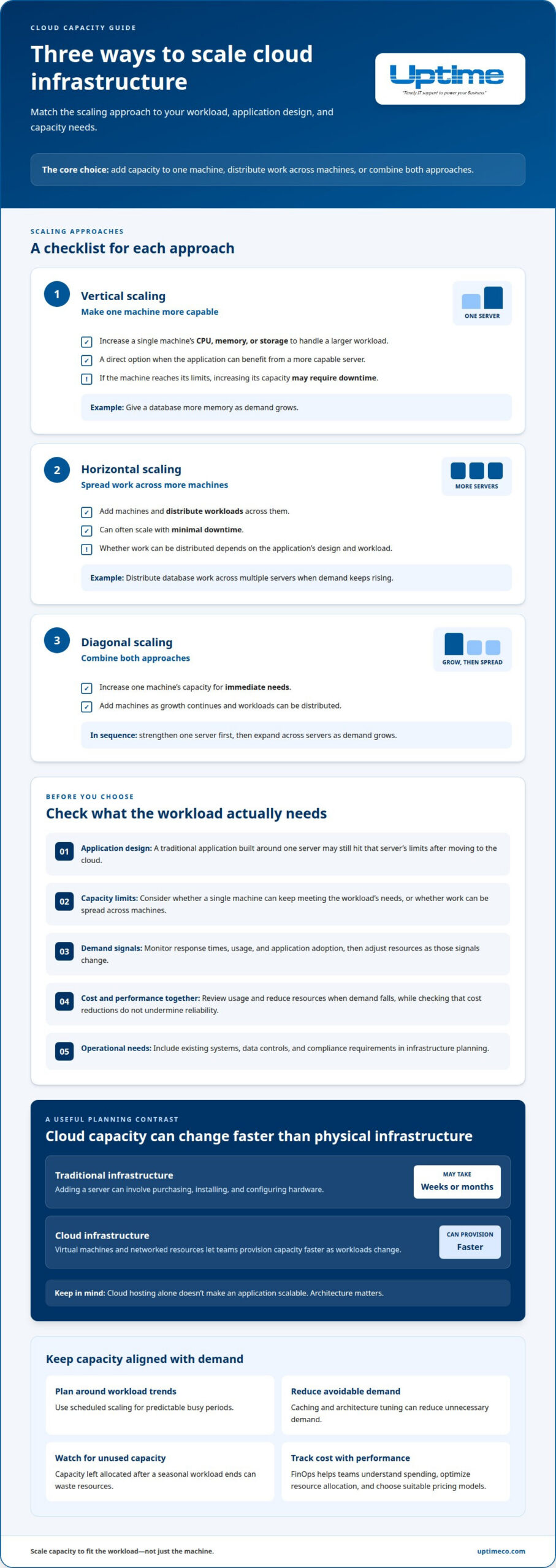
Vertical scaling increases a single machine’s CPU, memory, or storage capacity. It’s a direct way to handle a larger workload, but may require downtime if the machine reaches its limits. Horizontal scaling adds machines and distributes workloads across them, often with minimal downtime. Diagonal scaling combines both: increase one machine’s capacity for immediate needs, then add machines as growth continues.
For example, a database might first get more memory through vertical scaling. If demand keeps rising, horizontal scaling can distribute work across multiple servers. The right choice depends on application design, capacity limits, and how workloads can be distributed.
AWS, Microsoft Azure, and Google Cloud offer infrastructure as a service (IaaS), including computing, storage, and networking resources. Brea businesses comparing these platforms with local providers should focus on workload requirements, existing systems, data controls, and operational needs rather than assuming one option is best.
IaaS provides computing, storage, and network capacity that organizations can adjust as demand changes. Managed cloud services can add operational management, while hybrid cloud combines cloud resources with on-premises systems. These approaches support scaling across public cloud and local environments.
Hidden costs can arise when capacity stays allocated after demand drops or resource choices don’t match actual workloads. Load balancers can also add latency and overhead as they redirect traffic. Track usage and performance together to identify waste without compromising service.
For hybrid environments, cloud infrastructure planning can help align scaling choices with existing systems and workload needs.
Cloud and traditional infrastructure scalability
Traditional infrastructure grows through physical equipment: adding a server can mean purchasing, installing, and configuring hardware, a process that may take weeks or months. Cloud infrastructure uses virtual machines and networked resources, allowing organizations to provision capacity faster as applications and workloads change.
The key difference is architectural. A traditional application built around one server may still hit that server’s limits after moving to cloud computing. Virtualization makes it easier to move or resize machines, while containers and microservices let teams deploy application components independently. Design matters: cloud hosting alone doesn’t make an application scalable.
For Brea businesses, AWS, Microsoft Azure, and Google Cloud Platform are examples of infrastructure providers offering compute, storage, and networking. Local providers are another option. Compare each with workload needs, existing systems, and operational requirements. To assess low-latency infrastructure for Brea users, compare available provider regions and measure application response times from users’ locations. Provider names alone don’t show which infrastructure will be fastest.
Cloud security planning should include encrypted communications, encryption for sensitive data, controlled access, and backup and disaster recovery. Compliance requirements depend on the data and rules that apply to the organization. Plan storage location, access controls, and audit logging accordingly.
A migration typically starts by inventorying applications and dependencies, then selecting workloads for cloud deployment. Next, design the target architecture, test a representative workload, move data and applications, and monitor performance after cutover. Keep recovery plans in view throughout the transition.
For a practical migration plan, discuss cloud infrastructure planning.
Uptime: Cloud Services
Uptime Co. can help turn cloud scaling decisions into an infrastructure plan that fits your organization’s workloads. If you’re weighing a move to cloud services, coordinating cloud and on-premises systems, or planning for changing capacity needs, Uptime Co.’s Cloud Services can support the work.
Scaling also depends on the connections between systems and the safeguards around them. Network Infrastructure can support the environment your workloads rely on, while Cybersecurity Solutions help address security as systems evolve. Managed IT Services can keep infrastructure management aligned with your operations.
Bring your current setup, application priorities, and expected growth into the conversation. Contact Uptime Co. to discuss your cloud infrastructure plans.
Build a Cloud Plan That Can Grow With You
Connect infrastructure choices to real business priorities: which applications need room to grow, how teams will manage changing demand, and which safeguards must stay in place. A clear plan helps make scalable cloud infrastructure in Brea a practical foundation for future decisions, not just a response to today’s workload.
Uptime Co. brings Cloud Services together with Managed IT Services and Cybersecurity Solutions, helping businesses consider performance, operations, and protection as connected needs. If you’re ready to map out a cloud approach that fits your environment and growth plans, contact Uptime Co. about cloud infrastructure.
Take the next step with a plan built around how your business works today and where it’s headed.
Frequently Asked Questions
What are scalability patterns and techniques?
Patterns describe how an application gains capacity; techniques automate or streamline that change. Beyond vertical, horizontal, and diagonal scaling, teams can use containers or serverless computing to handle distinct workload components. Infrastructure as Code can standardize provisioning, while deployment pipelines automate testing and rollbacks. Choose techniques that fit the application’s architecture and keep changes consistent across environments.
How Can You Control Cost While Scaling?
Connect cloud spending to the workloads and teams that drive it. Review usage and billing by service, then investigate resources that remain active without serving a current need. Assign ownership for each workload and make resource reviews part of routine operations. This gives teams clearer accountability and helps catch waste before it becomes embedded in the infrastructure.
How Do You Assess Workload Patterns Before Designing for Scale?
Measure application response time, request volume, CPU load, and memory use during normal and busy periods. Separate steady workloads from seasonal peaks, scheduled batch jobs, and sudden bursts. Then test a representative surge to reveal bottlenecks that routine traffic may hide. These observations help match the design to actual behavior rather than assumptions.
How Does Scalability Work?
A scalable system detects or anticipates a capacity need, provisions suitable resources, and directs work to them. Teams can define usage thresholds that trigger resource changes, then test whether the application responds as expected. Monitor the results after each change. If response times remain slow, the bottleneck may be in the application or database rather than computing capacity.
How Should Storage, Database, and Data Layers Scale?
Scale each layer according to its bottleneck. Growing files may need more storage capacity, while a busy database may need additional computing resources or a design that distributes data and queries. Include backup and recovery needs as data grows. Test application behavior after changes, including whether reads, writes, and dependent services remain reliable.